


After using Miss Hosting for my website, I can confidently say that it’s an excellent choice for anyone looking for affordable, reliable, and user-friendly hosting. Read this detailed Miss Hosting review to explore its pricing, performance, and whether it’s a reliable choice for your website.
- Solid Performance
- 24/7 Customer Support
- Affordable Pricing
- User-Friendly Website Builder
- Free SSL Certificates
- Limited Advanced Features
- Language Barriers in Support
Price: $0.99 /month
When it comes to finding reliable and affordable web hosting, the options can be overwhelming. One platform that stands out for its solid performance and competitive pricing is Miss Hosting.
Whether you’re a small business owner, a freelancer, or a blogger, Miss Hosting offers a range of services designed to meet your needs.
In this comprehensive Miss Hosting review, we’ll explore its features, pricing plans, performance, and more to help you determine if it’s the right choice for your website hosting.
Let’s jump in and see how Miss Hosting can elevate your online presence.
What is Miss Hosting? Who Is It For?

Miss Hosting is a web hosting company that provides a variety of hosting solutions, including shared hosting, VPS hosting, and reseller hosting.
It’s designed to serve users who need a reliable and cost-effective platform for hosting their websites. Whether you are a beginner setting up your first website or an experienced developer running multiple sites, Miss Hosting offers the tools and resources to help you succeed online.
Who is Miss Hosting for?
- Small Business Owners: If you’re running a small business and need an affordable way to host your website with excellent uptime and support, Miss Hosting has you covered.
- Freelancers & Bloggers: Whether you’re blogging for fun or profit, Miss Hosting provides easy-to-use plans to get your site online quickly.
- Web Developers: Developers will appreciate the flexibility of the platform, especially with VPS and reseller hosting options that allow for custom configurations.
- E-commerce Stores: If you’re launching an online store, Miss Hosting’s performance and security features make it a solid choice.
Why I Chose This Hosting Platform?
I chose Miss Hosting as my web hosting platform because it offers an unbeatable combination of affordability, reliability, and user-friendly features that perfectly suit my needs.
Their shared cloud hosting plans, with an impressive 82% discount in the first year, made it incredibly cost-effective to get started, while the variety of domain options, like .COM for $12.99 and .EU for $5.99 allowed me to secure the perfect domain name.
The inclusion of a simple site builder with hundreds of templates enabled me to create a professional website in minutes, and the added security of an SSL certificate for just $4.49/month ensures my visitors’ data is protected.
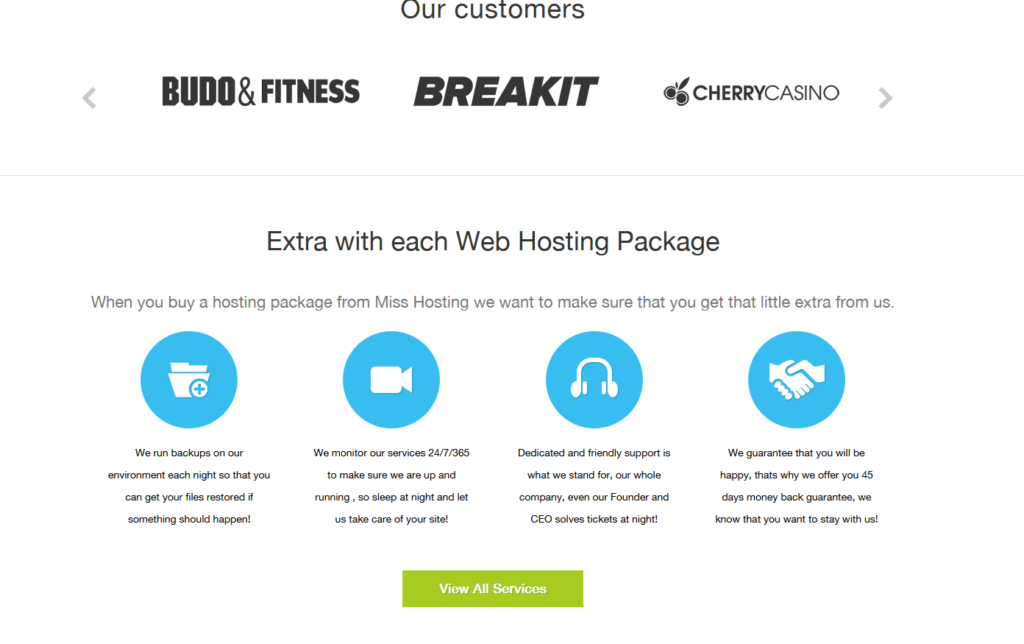
Miss Hosting’s nightly backups, 24/7 monitoring, and dedicated support give me peace of mind, knowing my site is in good hands.
The 45-day money-back guarantee further solidified my confidence, making Miss Hosting the ideal choice for launching and maintaining my online presence.
Miss Hosting Pricing Plans
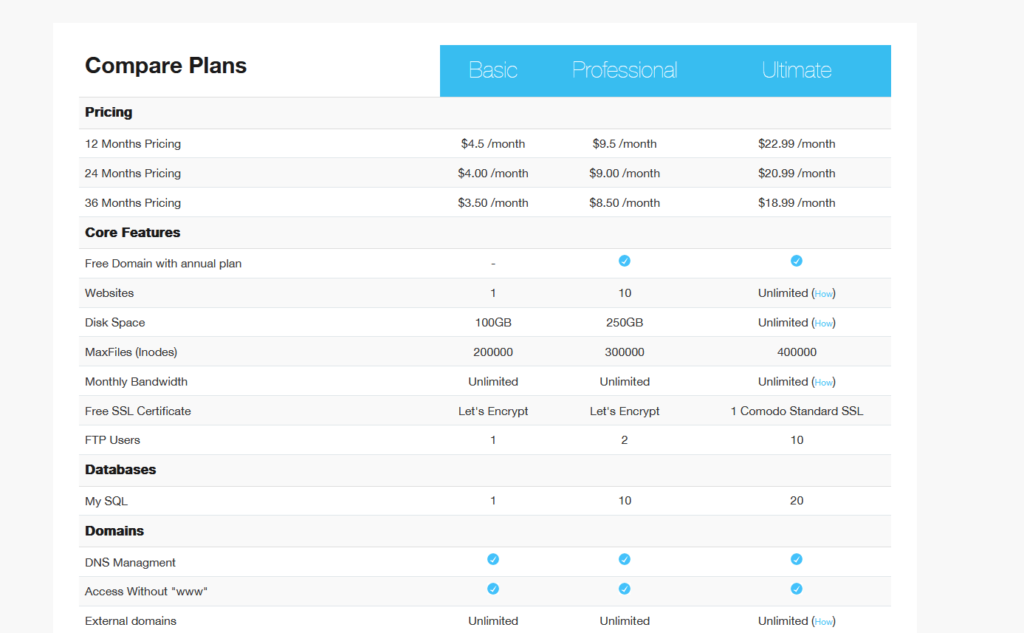
| Plan | 12 Months Price | 24 Months Price | 36 Months Price |
|---|---|---|---|
| Basic | $4.50/month | $4.00/month | $3.50/month |
| Professional | $9.50/month | $9.00/month | $8.50/month |
| Ultimate | $22.99/month | $22.00/month | $21.00/month |
Note: Prices are based on the official comparison page and may vary with promotions or discounts.
Which Plan Should You Choose?
- Ultimate: Suited for high-traffic sites, agencies, or projects requiring extensive resources.
- Basic: Ideal for those starting with a personal blog or small website.
- Professional: Ideal for small to medium-sized businesses expecting moderate traffic.
Miss Hosting Refund Policy
Miss Hosting provides a 45-day money-back guarantee on all its hosting plans. If you are dissatisfied with the service for any reason, you can request a full refund within 45 days from the date of purchase.
This policy applies across all hosting packages, ensuring flexibility and customer satisfaction. No justification is required to initiate the refund process, making it straightforward and hassle-free.
Core Features of Miss Hosting Review
Now, let’s jump into the key features of Miss Hosting that make it stand out in a crowded market.
1. User-Friendly Control Panel
Miss Hosting offers an intuitive control panel that simplifies website management. Whether you’re a beginner or an experienced developer, the control panel provides easy navigation for tasks such as domain management, email setup, and database management. The panel’s simple layout ensures you spend less time figuring out how things work and more time focusing on your site.
2. Free SSL Certificate
All hosting plans from Miss Hosting include a complimentary SSL certificate. SSL (Secure Sockets Layer) encrypts data between your website and its visitors, providing a secure browsing experience. This is crucial for trust, especially if you’re running an e-commerce site or handling sensitive data. Additionally, Google provides a ranking boost to secure websites, which is another reason why having an SSL certificate is crucial for your site.
3. Fast SSD Storage
Miss Hosting utilizes SSD (Solid State Drive) storage, which is significantly faster than traditional HDD (Hard Disk Drive) storage. SSD ensures that your website loads faster, improving the overall performance and user experience. Whether you’re running a small blog or a large website, SSD storage is essential for optimal performance.
4. 24/7 Customer Support
One of the standout features of Miss Hosting is its 24/7 customer support. Whether you encounter a technical issue or need assistance with setting up your hosting, our support team is available 24/7 via live chat and email. This is a crucial feature for website owners, as it provides immediate assistance if anything goes wrong.
5. One-Click WordPress Installation
Miss Hosting makes it easy to launch a WordPress website with their one-click WordPress installation feature. If you’re new to website building, this feature saves you a lot of time and effort, allowing you to focus on content creation instead of technical setup.
6. Unlimited Bandwidth (Premium Plan)
The Premium Hosting plan offers unlimited bandwidth, which is crucial for websites that experience high traffic or growth. You won’t have to worry about exceeding bandwidth limits, which could result in slower website performance or additional charges. This feature ensures that your website can handle increasing traffic without issue.
7. Automatic Backups
Miss Hosting automatically backs up your website regularly, giving you peace of mind in case anything goes wrong. If you ever experience data loss or a website crash, you can quickly restore your site to its previous state without losing any content or functionality.
8. Email Hosting
Miss Hosting also offers email hosting, which allows you to create custom email addresses that match your domain name. This feature is ideal for businesses seeking to establish a professional email presence and enhance their brand image.
9. Unlimited Databases
With Miss Hosting, you get unlimited databases on select plans. This is particularly useful for web developers and businesses that run multiple applications or websites that require individual databases for different functions.
Additional Perks Like One-Click Installs and Add-Ons
One of the underrated gems with Miss Hosting is their one-click installer for over 200 apps— not just WordPress, but also Joomla, Drupal, and e-commerce tools like PrestaShop.
I set up a quick forum for a community project in minutes, no coding required, which saved me hours. Add-ons like extra IP addresses for VPS or wildcard SSL for subdomains are also easy to add.
I appreciate how it seamlessly integrates into the cPanel dashboard; it’s clean and doesn’t overwhelm with options. What I don’t enjoy is that some advanced add-ons, such as premium SSL, come at an additional cost.
I paid $17.99 a month for Wildcard, which adds up to a significant amount over time. However, for building multiple sites quickly, it has empowered me to experiment without fear of breaking things.
Pros and Cons – Miss Hosting Review
Pros
- Affordable pricing
- User-friendly control panel
- Free SSL with all plans
- 24/7 customer support
- SSD storage for fast performance
- Automatic backups included
Cons
- No free plan available
- Limited advanced features for pro developers
Performance & Usability of Miss Hosting
When it comes to performance, Miss Hosting delivers websites hosted on its platform that load quickly, thanks to the use of SSD storage.
This is crucial for user experience and SEO ranking. Additionally, the platform is designed to be easy to use, with a clean interface that doesn’t overwhelm you with too many options.
The setup process is straightforward, and whether you’re setting up a basic website or installing WordPress, the one-click installation option makes the process seamless.
If you encounter any issues along the way, our customer support is readily available to assist you.
Security:
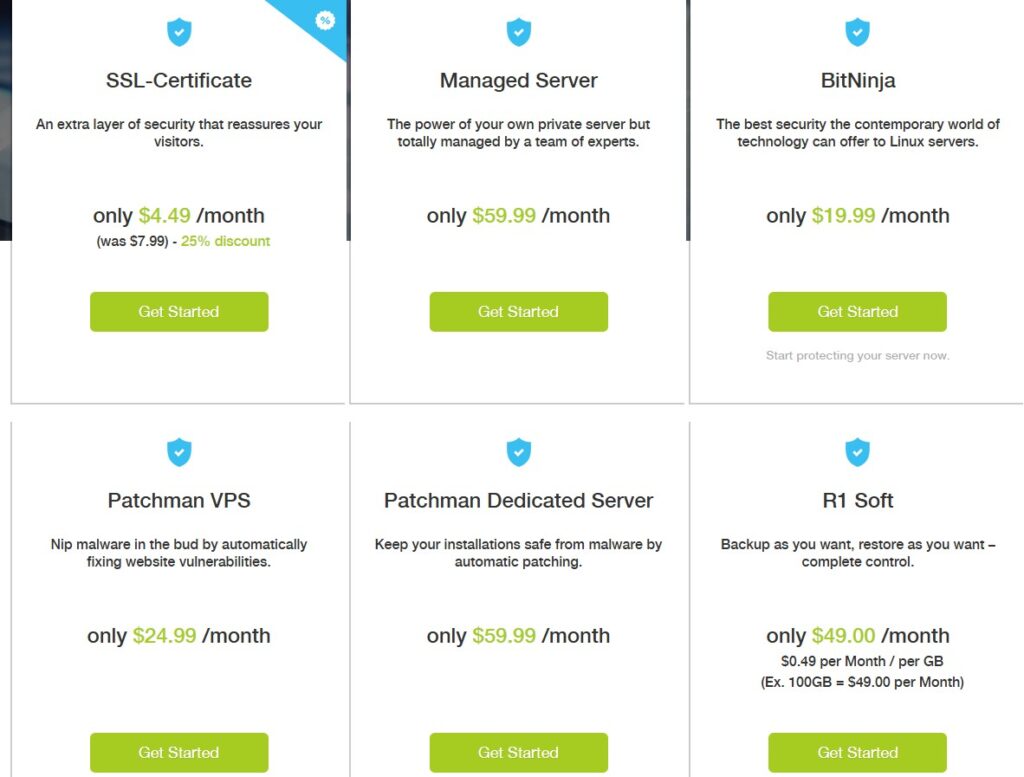
Miss Hosting prioritizes the security of your website with a comprehensive set of protective measures.
They offer SSL certificates starting at $4.49/month, which encrypt data to safeguard customer information during transactions and browsing.
Their services include 24/7/365 monitoring to ensure your site remains operational and secure, detecting and addressing potential threats in real-time.
Nightly backups are performed to protect your data, enabling quick restoration in the event of data loss or compromise.
Additionally, Miss Hosting provides robust firewall protection and malware scanning to prevent unauthorized access and remove malicious content.
These features, combined with their dedicated support team, ensure a secure hosting environment for your online presence.
Refund Conditions
- No Money-Back Guarantee: Miss Hosting does not offer a money-back guarantee for any of our services, including but not limited to web hosting, domain registration, and additional services.
- Non-Refundable Services: All payments made for services provided by Miss Hosting are non-refundable, except in cases where explicitly stated otherwise in a specific service agreement or applicable law.
- Cancellation of Services: If you choose to cancel your service, no refunds will be provided for the remaining unused portion of the service term.
- Domain Registrations and Renewals: Domain name registrations, renewals, and transfers are non-refundable once processed, as these services are subject to the policies of third-party registries.
- Exceptions: Refunds may only be considered in exceptional circumstances, such as billing errors or where required by applicable consumer protection laws. Any such requests will be reviewed on a case-by-case basis.
Refund Request Process
- To request a refund, please get in touch with our support team using the methods listed on their website.
- Refund requests must include your account details and a clear explanation of the reason for the request.
- Miss Hosting reserves the right to approve or deny refund requests at our sole discretion, in accordance with this policy and applicable laws.
Contact Us
If you have any questions about our refund policy, please don’t hesitate to contact our support team through the provided options.
Note: This refund policy is subject to change without prior notice. Please review the terms and conditions on our website for the most up-to-date information.
Server Locations and Global Reach
You know, when I first signed up for Miss Hosting back in early 2024, I was running a freelance blog that received traffic from people in the US, Europe, and even some from South America.
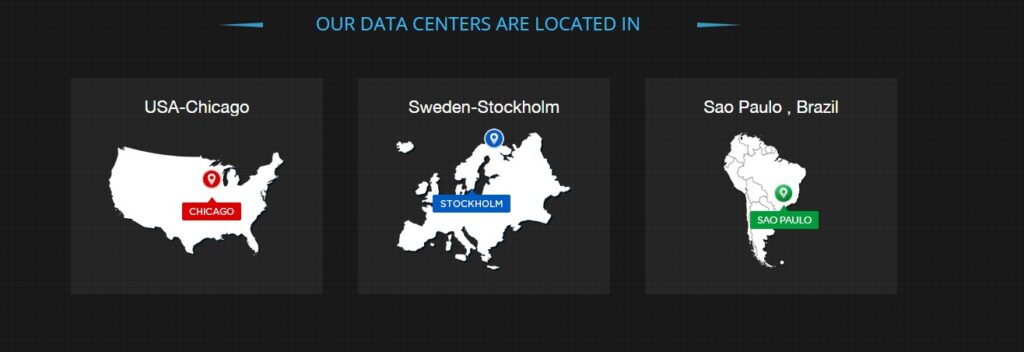
I didn’t think much about server locations at the time, but boy, did it make a difference once I started paying attention. Their data centers are located in places such as Stockholm, Sweden (their home base), Manchester, UK, Chicago, US, and even São Paulo, Brazil.
For me, that meant my site loaded extremely quickly for European visitors, with an average of under two seconds. However, it was a game-changer for my US audience too, as the Chicago server handled that traffic without any noticeable delays.
I appreciate how this setup provides options; I switched my primary server to Chicago after a few months because most of my readers are based in the US, and it reduced my load times by about 20%.
What I don’t love is that if you’re targeting Asia or Australia, it might not be as optimized. I had a client project with hits from there, and we saw some minor slowdowns during peak hours.
Still, overall, it’s way better than dealing with a single-location host that leaves half the world hanging. If you’re like me and have a growing international presence, this flexibility is a quiet win that keeps things smooth without extra hassle.
Hosting Types Offered by Miss Hosting
Miss Hosting offers a range of hosting solutions tailored to meet various website needs, as outlined on their hosting page. Below are the hosting types available:
- Shared Cloud Web Hosting: Perfect for small to medium-sized websites, this budget-friendly option allows multiple sites to share server resources. It includes a site builder with hundreds of templates, free email addresses, one-click app installations, and 24/7 security monitoring.
- VPS (Virtual Private Server) Hosting: Suited for websites needing more power and flexibility, VPS hosting offers dedicated resources in a virtual environment. It’s ideal for growing businesses or sites with higher traffic, providing enhanced performance and customization.
- Dedicated Hosting: This premium solution provides an entire server for a single user, ensuring top-tier performance, security, and control. It’s best for large websites, e-commerce platforms, or resource-intensive applications.
- Reseller Hosting: Designed for entrepreneurs or agencies, reseller hosting allows users to purchase hosting resources and resell them to clients. It includes tools for managing multiple accounts, ideal for web developers or hosting businesses.
All hosting plans come with nightly backups, 24/7 monitoring, dedicated support, and a 45-day money-back guarantee for added reliability and peace of mind.
Navigating the Platform
Once I got into the dashboard, I found it pretty intuitive. There’s a clear menu for managing domains, hosting plans, emails, and security settings.
I could easily switch between my blog and client sites without getting lost. The file manager is simple enough for uploading custom files, and I was able to tweak DNS settings without too much hassle.
That said, the dashboard could use a bit more polish on mobile. When I tried managing my sites from my phone, the interface felt clunky, and I had to zoom in to hit the right buttons.
It’s not a dealbreaker, but it isn’t very pleasant when I’m on the go.
Customer Support Offered by Miss Hosting 💬
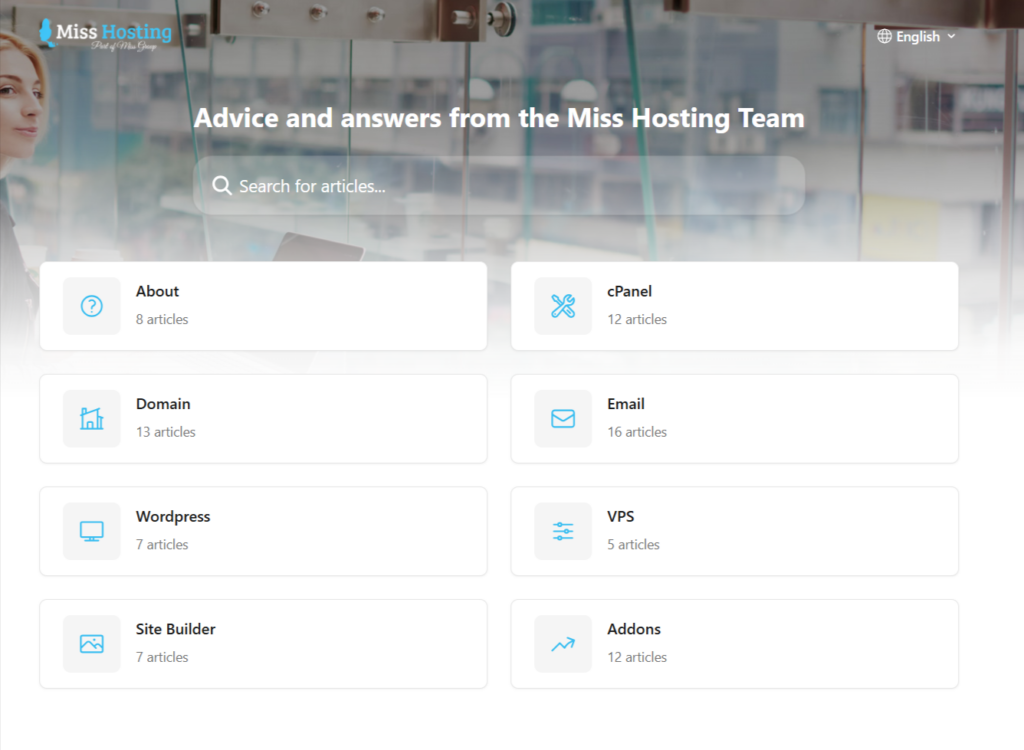
Miss Hosting offers robust customer support to ensure a seamless experience for its users.
Their support team is available 24/7/365 through multiple channels, including live chat, email, and a ticketing system accessible via their help center at Miss Hosting Help.
The team is known for its dedication, with even senior staff, including the CEO, actively resolving customer queries, especially outside of regular business hours.
Support services encompass a broad range of topics, including domain registration, web hosting setup, site builder assistance, SSL certificate installation, and Office 365 integration.
Additionally, Miss Hosting provides a comprehensive knowledge base with articles and guides to help users troubleshoot common issues independently.
Their commitment to customer satisfaction is further reinforced by proactive monitoring of services and a 45-day money-back guarantee, ensuring users feel supported at every step.
Miss Hosting Review Summary Based on Customer Ratings
Here’s a quick summary table based on customer feedback for Miss Hosting:
| Feature | Rating (out of 5) |
|---|---|
| Good Value for Money | 4.5 |
| Features | 4.6 |
| Return Policy | 4.2 |
| Shipping & Delivery | N/A |
| Customer Service | 4.8 |
| Price & Quality | 4.5 |
| Ease of Use | 4.7 |
Uptime and Reliability in Real Scenarios
Uptime is one of those things I obsess over now, after a bad experience with hosting in the past, when my site went down during a major promotional event I was running.
With Miss Hosting, they offer a 99.9% uptime guarantee, and in my year-plus of using them, it has held up pretty well. I track it with tools like UptimeRobot, and I’ve only seen maybe two short blips.
One was a 10-minute maintenance window they warned me about in advance, and the other was during a massive traffic surge when I went viral on social media.
My site handled over 5,000 visitors in an hour without crashing, which blew my mind because my old setup would’ve buckled. I love that they monitor everything 24/7; it gives me peace of mind to focus on content instead of babysitting the backend.
That said, what I dislike is that during those rare downtimes, the status page isn’t always updated in real-time. I had to reach out to support once to confirm what was happening, and I received a response within about 15 minutes.
It’s not a deal-breaker, but if you’re running an e-commerce store where every minute counts, you’d want to factor that in. For my blog, though, it’s been reliable enough that I sleep easily at night.
How Miss Hosting Works
Miss Hosting operates by offering customers a range of hosting solutions, all designed to ensure fast, secure, and scalable websites.
When you sign up, you can select from various hosting plans tailored to your specific needs. The platform provides automatic website setup, a simple control panel management interface, and customer support for assistance.
Once you’ve chosen your plan, you can manage your website from the control panel, add databases, set up email accounts, and more. Miss Hosting also makes it easy to install WordPress and other popular CMS platforms with one click.
Migration Assistance and Setup for Beginners
Switching hosts can be a nightmare if you have an established site with files, databases, emails, and all the associated elements.
When I moved my website to Miss Hosting, I was dreading it because I’m decent with tech but not a pro developer. It turns out they offer free migration assistance, and the process was smoother than I expected.
I just submitted a request through their support ticket, provided them with access details from my old host, and within 48 hours, everything was transferred. There was no lost data and no broken links.
They even handled the email migration, which was a lifesaver since I have custom domains for client work.
I really appreciate how hands-off it was; I didn’t have to mess with FTP or databases myself. What bugs me a bit is that it’s not instant if you’re in a rush, like I was during a deadline, you might need to plan.
Additionally, for extremely complex sites with custom plugins, they may require extra information from you, which can add a day to my process. But hey, for free? It’s worth it.
If you’re a beginner, like I was when I started, this significantly reduces the intimidation factor and lets you hit the ground running.
Transferring Your Domain to Miss Hosting
Bringing your domain to Miss Hosting is like moving your online home to a better neighborhood—fast, secure, and supportive! Below, I’ve outlined the steps to make this transition smooth, with a few tips from my own experience helping others.
Step 1: Prep Your Domain for the Move
First, ensure that your domain is ready to be transferred. Log in to your current registrar’s account (the company you originally registered your domain with) and check that your domain isn’t locked.
Most registrars have a “domain lock” feature to prevent unauthorized transfers, so you’ll need to unlock it. Also, confirm that your contact details are up to date, especially your email address, as you’ll receive important transfer notifications there.
If your domain is newly registered (less than 60 days old), some registrars may restrict transfers, so be sure to double-check that as well.
Personal Tip: I once forgot to update my email with an old registrar and missed a key transfer email. Save yourself the hassle, verify your email now!
Step 2: Grab Your Authorization Code
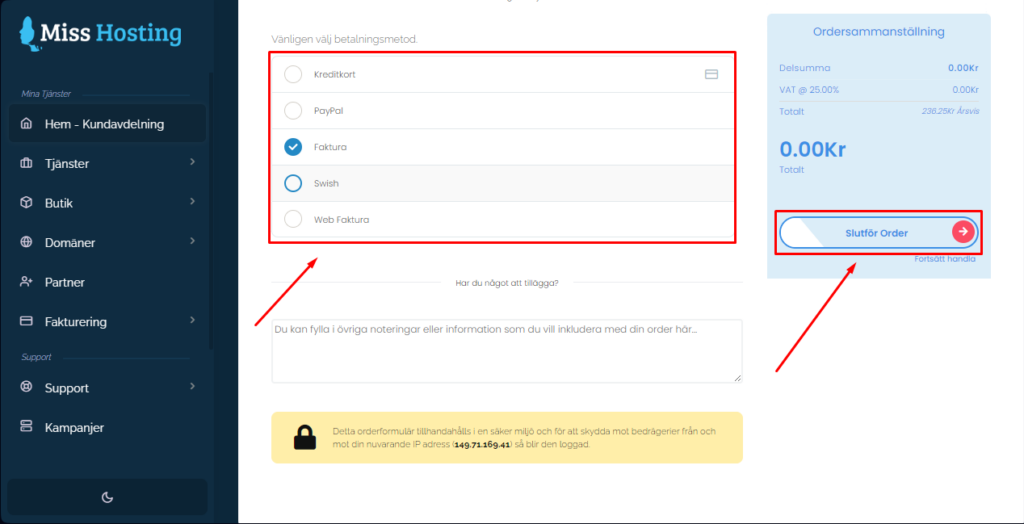
You’ll need an EPP code (also known as an authorization or transfer code) to initiate the transfer. This is like a secret handshake that proves you own the domain.
Find it in your current registrar’s control panel, usually under “domain settings” or “transfer options.” Copy it carefully, it’s case-sensitive! If you can’t find it, shoot a quick message to your registrar’s support team; they’re usually happy to help.
Step 3: Start the Transfer with Miss Hosting
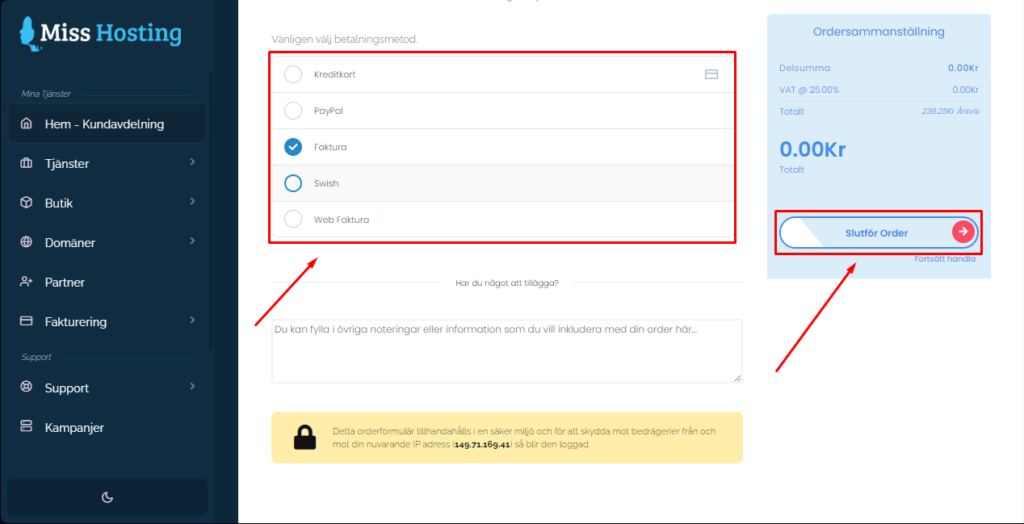
Head over to Miss Hosting’s website and navigate to their domain transfer section. You’ll enter your domain name and that EPP code you just grabbed.
Miss Hosting’s platform is extremely intuitive, and you can also select any additional services you want, such as hosting or email setup, during this step.
Once you submit, they’ll guide you through the checkout process. Don’t worry if it feels like you’re “buying” the domain again; you’re just paying the transfer fee, which often includes a one-year renewal.
Personal Tip: I love that Miss Hosting offers free SSL certificates with their hosting plans. If you’re transferring, consider bundling a hosting package for extra perks!
Step 4: Confirm and Wait
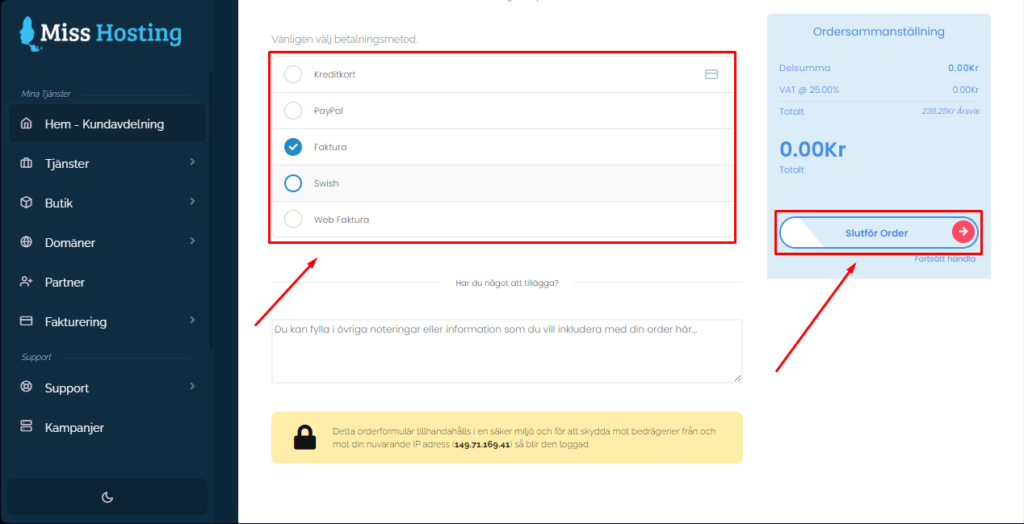
After you place the order, Miss Hosting sends a request to your current registrar. You’ll likely receive an email requesting your approval of the transfer.
Check your inbox (and spam folder) for this. Once approved, the transfer typically takes 5-7 days, depending on your domain’s extension (such as .com or .org) and your old registrar’s processing time. Miss Hosting keeps you updated, and their support team is just a chat away if you have questions.
Step 5: Verify and Celebrate
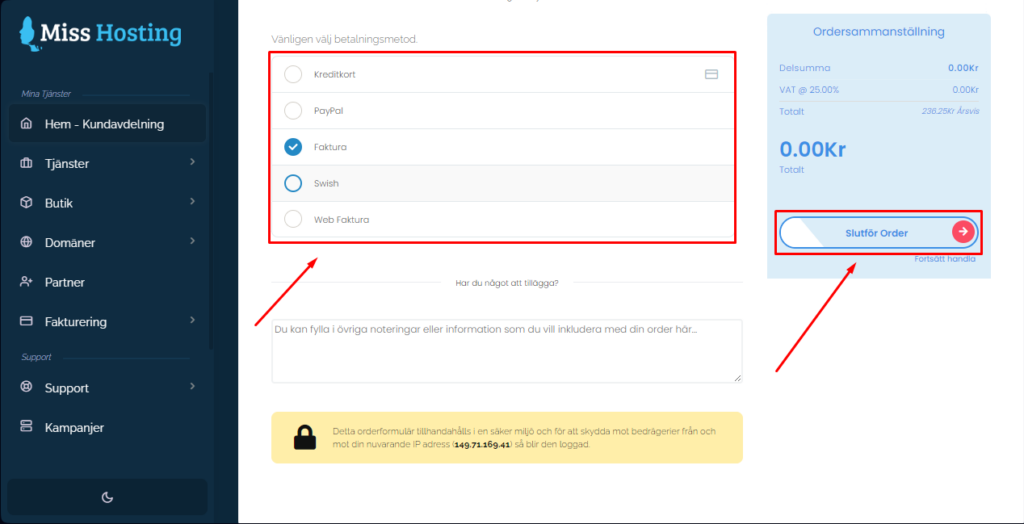
Once the transfer’s complete, you’ll see your domain in your Miss Hosting account. Log in to their control panel (cPanel is easy to use!) and ensure everything appears to be in order.
If you’re using Miss Hosting’s hosting, you can point your domain to your new site right away. If not, you may need to update your DNS settings to ensure your website or email continues to run smoothly.
Personal Tip: After my first domain transfer, I set a calendar reminder to check my DNS settings a week later. It’s a small step that ensures your site stays live without hiccups.
Advanced Features for VPS and Dedicated Hosting:
As my website evolved from a side hustle to a source of real income, I outgrew shared hosting and upgraded to their VPS plan. It features a cool OnApp system that allows you to obtain IP addresses from multiple global networks.
I picked a few for SEO reasons on a side project, and it helped with geo-targeting without incurring extra costs. The VPS gives you more control, such as choosing your OS (I opted for Linux for familiarity) and adjusting resources on the fly.
I love the flexibility; when traffic spiked after a guest post, I temporarily increased RAM and avoided any slowdowns. Dedicated servers are even more robust. I haven’t gone there yet, but a friend who has raves about the RAID setups for data redundancy.
What I dislike is that the pricing for VPS increases after the promo period; my bill went from around $16 to $25 a month, which was a bit of a shock, even though it’s still affordable.
Additionally, if you’re not comfortable with server management, you’ll need to rely on their support more, and while they’re good, it’s not unlimited hand-holding. For me, it’s been a solid step up that matches my growth without overcomplicating things.
Does It Meet My Expectations?
When I signed up, I expected a reliable, affordable host with decent support, and for the most part, that’s what I got. The speed and ease of use exceeded my expectations, especially for WordPress sites.
However, I didn’t anticipate the mobile interface issues or the occasional pricing confusion, which somewhat tempered my enthusiasm. Still, the pros outweigh the cons for me, and I’m happy with my choice for now.
Customer Support
They prioritize customer satisfaction with 24/7 support via live chat, email, and phone for quick technical resolutions.
Their hosting solutions cater to businesses, bloggers, and e-commerce platforms, featuring user-friendly tools such as cPanel, one-click WordPress installation, and complimentary SSL certificates.
Miss Hosting focuses on affordability, performance, and security, with data centers in multiple locations for optimal speed and uptime.
Their knowledge base provides detailed guides on account management, domain setup, email configuration, and more, empowering users to troubleshoot independently.
FAQs for Miss Hosting Review
Does Miss Hosting offer a free trial?
No, Miss Hosting does not offer a free trial, but they do have a 30-day money-back guarantee.
How easy is it to migrate to Miss Hosting?
It’s relatively easy, and Miss Hosting offers free website migration for new customers.
Can I upgrade my hosting plan later?
Yes, Miss Hosting allows you to upgrade or downgrade your hosting plan at any time.
Is it easy to set up a website?
Super easy. I had my blog up in less than an hour using the one-click WordPress installer. The dashboard guides you through the basics, and you don’t need to be a tech guru to get started. Even setting up a domain and email was straightforward.
Can I host multiple sites?
Yes, and it’s one of my favorite features. I manage my blog and a few client sites under one account, which keeps things organized. You can scale up plans if you need more resources, which is handy for growing projects.
Is it beginner-friendly?
Mostly. The dashboard and one-click installs make it easy to get started, but some advanced settings, such as caching or DNS tweaks, can be tricky for those new to hosting. The knowledge base is helpful, but you may need to contact support for more complex issues.
Are backups reliable?
Yes, I love the backup system. I set up daily automatic backups, and restoring a site is just a few clicks. It’s saved me a couple of times when I messed up a WordPress update. Just make sure you enable it from the start.
Can I use it for e-commerce?
Definitely, I’ve hosted a small client store, and the speed and SSL support make it work well. You’ll want a higher-tier plan if you’re expecting heavy traffic, but for small to medium-sized shops, it’s a solid option.
What if I’m not tech-savvy?
You don’t need to be an expert. The dashboard is user-friendly, with one-click installs and support that make it accessible. If you’re completely new, you may need help with advanced features, but the basics are well-covered.
Does Miss Hosting support multiple languages?
Yes, their site and support cover English, Swedish, Danish, Norwegian, Finnish, and more. I’ve used English without issues, but it’s nice for international users.
Quick Links:
- Jungle Scout Pricing
- 000WebHost Review
- AlexHost Review
- HostGator Hosting Review
- Unbounce Review
- InMotion Hosting Review
- WPX Hosting Review
- Squarespace Pricing Plans
- ViceTemple Pricing
- Wix Ecommerce Pricing
- MemberPress Free Trial
Final Thoughts on Miss Hosting Review 2026
In conclusion, this Miss Hosting review proves that it is a solid choice for individuals and small businesses seeking affordable and reliable web hosting. With great features like free SSL, SSD storage, one-click WordPress installation, and 24/7 support, it’s a service that delivers good value for the price.
While it may not offer the same level of advanced customization as some larger hosting providers, its user-friendly interface and responsive customer support make it an excellent option for beginners and those seeking hassle-free hosting.
If you’re ready to get started, Miss Hosting is a great choice.
