

If you’re looking for an all-in-one digital marketing tool that can handle everything from SEO to content marketing, SEMrush is undoubtedly one of the best in the industry. As a seasoned marketer, I can confidently say that SEMrush provides an extensive suite of tools that help businesses streamline their marketing efforts, improve SEO rankings, and drive more traffic to their websites.
- User-Friendly Interface
- Competitive Analysis
- Keyword Research
- Comprehensive Toolset
- No Free Plan
- Reporting Limitations
Price: $139/month
When I first started trying to figure out how to get my website noticed online, it felt like I was trying to find a needle in a haystack.
I heard a lot of buzz about this tool called SEMrush, and honestly, I was a bit skeptical. Could one piece of software really help with all the tricky parts of online visibility, such as finding keywords, checking out competitors, and fixing website issues?
Well, I decided to jump in and see for myself, and my journey with SEMrush has been pretty eye-opening.
What Is Semrush and Who’s It For?
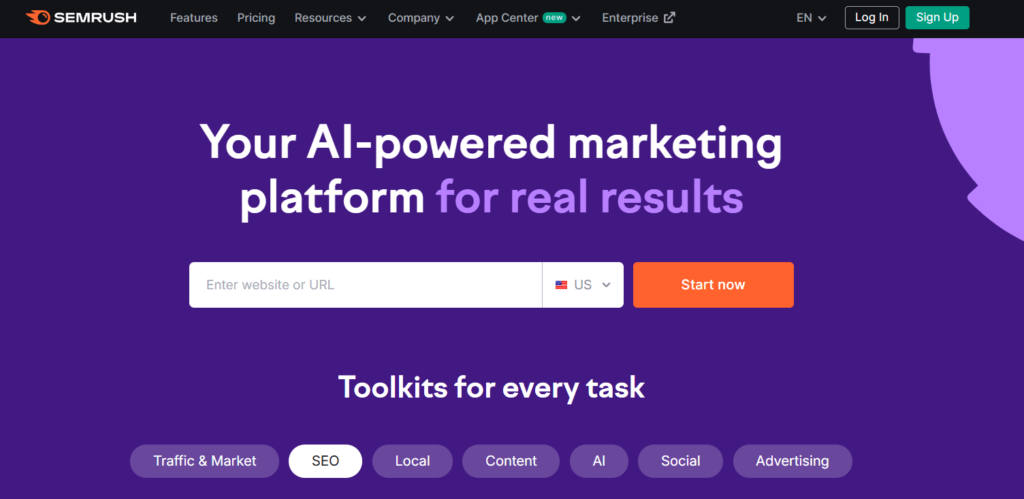
Semrush is like a superhero for digital marketers. Launched in 2008, it’s grown into a powerhouse trusted by brands like Tesla and Forbes. Its tools cover everything from keyword research to site audits, backlink tracking, and AI-driven content creation.
Whether you want to rank higher on Google, optimize ad campaigns, or analyze competitors, Semrush has you covered.
Who’s it for?
- Bloggers aiming to boost organic traffic with smart SEO.
- Small businesses want to dominate local or niche markets.
- Agencies are juggling SEO and PPC for multiple clients.
- Enterprises need custom reports and deep analytics.
- Marketers are curious about rivals’ ads, keywords, or social strategies.
Semrush’s flexibility makes it ideal for beginners and pros alike. Its massive data and user-friendly interface let anyone harness the power of SEO and marketing.
Pricing Table of Semrush
Semrush offers three main plans—Pro, Guru, and Business—plus custom Enterprise options. Here’s the 2025 pricing breakdown based on official data:
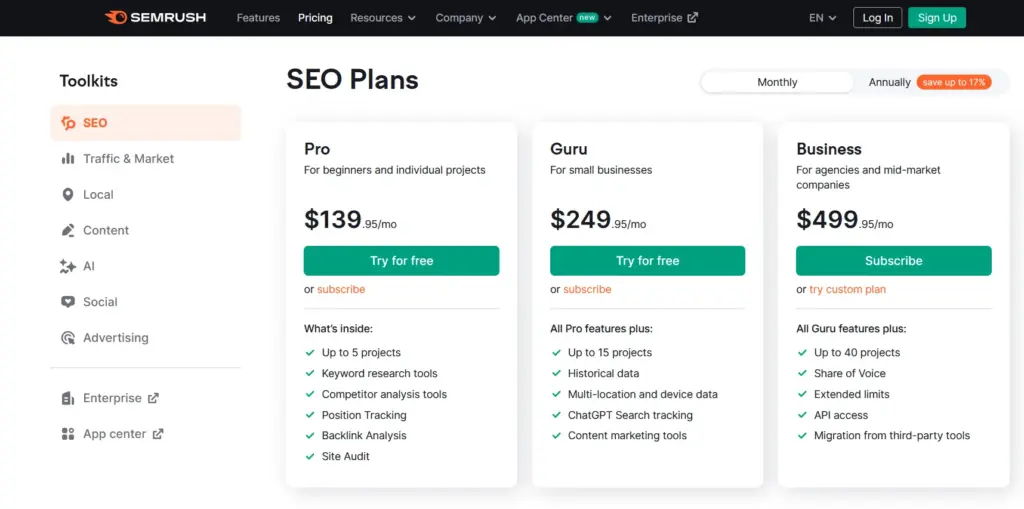
| Plan | Monthly Price | Yearly Price (Monthly Equivalent) | Features | Best For |
|---|---|---|---|---|
| Free | $0 | $0 | 10 searches/day, 10 keyword tracks, basic tools | Beginners testing the waters |
| Pro | $139.95 | $117.33 (~17% savings) | 5 projects, 500 keywords, 10,000 results/report, core SEO tools | Freelancers, small teams |
| Guru | $249.95 | $208.33 (~17% savings) | 15 projects, 1,500 keywords, 30,000 results/report, content tools, historical data | Growing agencies, SMBs |
| Business | $499.95 | $416.66 (~17% savings) | 40 projects, 5,000 keywords, 50,000 results/report, API access, white-label reports | Large agencies, enterprises |
Add-Ons:
- Trends: $289/month for market insights.
- Local SEO: $50–$60/month for local rankings.
- Agency Growth Kit: $69–$249/month for client management.
- Extra users: $45–$100/month per user.
Note: Annual billing saves 17%. Pro and Guru plans offer a 14-day free trial, and a 7-day refund policy applies. Prices are in USD.
Refund Policy:
When it comes to subscriptions, understanding the cancellation and refund policy is always a good idea. For SEMrush, their policy applies specifically to online purchases made directly from SEMrush. If you have a signed agreement with them, such as an enterprise agreement, then your specific contract terms would apply instead.
Suppose you decide that SEMrush isn’t the right fit after signing up online. In that case, you can cancel your subscription at any time by logging into your user account and submitting a cancellation request through their designated form.
It’s important to be logged in and answer all questions in the form for your request to be processed correctly. Your cancellation will take effect at the end of your current subscription term.
Regarding refunds, SEMrush offers a one-time, 7-day money-back guarantee. This guarantee is exclusively for customers who purchased a subscription directly from their website using a credit card.
To be eligible for this refund, you must submit a written refund request within 7 calendar days of your initial online subscription order or your initial additional license add-on order.
It’s crucial to note that if you cancel a subscription during an existing term, you generally won’t be entitled to a refund for prepaid amounts unless it’s within that initial 7-day window.
To request a refund, if you’re using the cancellation form, you must explicitly state your refund request in the “additional comment” field. Alternatively, you can submit a refund request through their Contact Form, making sure to include your SEMrush account details.
They may ask for information like your name, transaction ID, the last four digits of the credit card used, billing date, email address, login name, and other identity verification details to process your request.
Failing to provide this information in a timely manner (within the 7 days after initial purchase) could lead to your refund request being denied.
If your refund request is properly submitted within the 7 days following your initial purchase, SEMrush will process the refund of your prepaid fees within 30 calendar days.
The refund will be issued using the same payment method you originally used. Keep in mind that any bank fees or charges you incur (like currency conversion fees) are your responsibility.
They also reserve the right to deny refund requests in line with their overall Terms of Service.
My Personal Experience with Semrush and Why I Recommend It?
I signed up for Semrush’s Pro plan to grow my blog’s traffic and help a client’s e-commerce site. The Keyword Magic Tool was a revelation. I found 300+ long-tail keywords for a niche post in minutes, boosting its traffic by 150% in a month.
The Site Audit flagged broken links and slow pages, which I fixed to climb Google’s rankings.
For my client, the Competitor Analysis revealed their rival’s top ads, letting us craft smarter PPC campaigns that cut costs by 20%.
Upgrading to Guru unlocked historical data, showing a competitor’s traffic dip after a Google update—gold for strategy! Semrush’s reports saved me hours when pitching clients, and the Content Marketing Toolkit helped me plan blog posts that ranked on page one. The interface is intuitive, and the free trial gave me the confidence to commit.
Why I recommend Semrush:
- It’s a one-stop shop for SEO, PPC, and content.
- Data-driven insights deliver real results, like traffic spikes or ad savings.
- The dashboard is easy for beginners but powerful for pros.
- Regular updates keep tools cutting-edge for 2026 trends.
Semrush isn’t cheap, but its impact on my blog and client work makes it worth every penny.
Core Features of Semrush
Semrush shines with its robust toolkit. Here are 8 key features, explained in detail with their benefits:

1. Keyword Magic Tool
This tool is your keyword research wizard, pulling from a 26.4 billion keyword database. Enter a seed keyword (e.g., “best laptops”), and it generates thousands of related terms with metrics like search volume, difficulty, and cost-per-click.
You can filter by long-tail, questions, or location. For example, I found “best laptops for students 2025” with 8,000 monthly searches and low competition, perfect for ranking.
Benefits:
- Uncovers low-competition keywords to boost rankings.
- Saves hours with filters for intent (e.g., informational, commercial).
- Exports keyword lists for content planning or PPC campaigns.
- Local keyword data helps target specific regions.
Why It Matters: Keywords drive SEO success. This tool makes finding winners effortless, giving you an edge over competitors.
2. Site Audit
Semrush scans your website for 140+ technical issues, like broken links, slow pages, or missing meta tags. It delivers a health score (e.g., 85/100) and a prioritized fix list. For my blog, I resolved duplicate content and crawl errors to improve my site’s speed and rankings.
Benefits:
- Identifies SEO roadblocks that hurt rankings.
- Step-by-step fix guides suit non-techies.
- Tracks progress with weekly audits.
- Exports reports for clients or teams.
Why It Matters: A healthy site ranks higher. This tool keeps your site in top shape, saving time and boosting performance.
3. Competitor Analysis
Semrush lets you spy on rivals’ strategies. Enter a competitor’s domain, and it reveals their top keywords, backlinks, ad campaigns, and traffic sources.
I discovered a rival’s $5,000/month ad spend on Google Ads, which allowed me to target their weaker keywords for cheaper wins.
Benefits:
- Uncovers gaps in competitors’ strategies to exploit.
- Tracks rivals’ traffic trends over time.
- Analyzes paid and organic performance for 360-degree insights.
- Saves research time with automated reports.
Why It Matters: Knowing your rivals’ moves helps you stay ahead. This feature is like having a marketing crystal ball.
4. Backlink Analytics
Backlinks are SEO gold, and Semrush tracks 43 trillion of them. Analyze your site’s backlinks or scout competitors’ to find link-building opportunities.
It shows link quality, anchor text, and referring domains. I found a competitor’s guest post on a high-authority blog and pitched a similar link, boosting my domain authority.
Benefits:
- Identifies toxic links that hurt SEO.
- Finds high-value sites for outreach.
- Tracks link growth to measure progress.
- Compares your link profile to rivals’.
Why It Matters: Quality backlinks drive rankings. This tool simplifies link-building, a critical SEO strategy.
5. Content Marketing Toolkit
Semrush’s content tools help you plan, write, and optimize blog posts. The SEO Content Template suggests keywords, length, and structure based on top-ranking pages. The Writing Assistant checks readability and SEO in real time.
I used it to optimize a 2,000-word post, landing it on Google’s first page in two weeks.
Benefits:
- Creates data-driven content plans that rank.
- Improves readability for better user engagement.
- Tracks content performance (e.g., shares, clicks).
- Integrates with Google Docs or WordPress.
Why It Matters: Content is king, but only if it ranks. These tools ensure your posts hit SEO and audience goals.
6. Position Tracking
Monitor your site’s rankings for target keywords daily. Set up campaigns to track rankings globally or locally (e.g., “coffee shop Seattle”). Semrush shows your position, search volume, and competitors’ rankings.
I tracked 100 keywords for a client, spotting a drop after an algorithm update and adjusting our strategy.
Benefits:
- Tracks ranking changes to measure SEO success.
- Compares your rankings to competitors’.
- Alerts you to sudden drops or gains.
- Supports local SEO for small businesses.
Why It Matters: Rankings drive traffic. This tool keeps you in the loop, letting you act fast to stay on top.
7. Social Media Toolkit
Manage your social presence with tools for scheduling posts, analyzing engagement, and tracking competitors’ social strategies.
Supports platforms like Instagram, LinkedIn, and X. I scheduled a month’s posts for a client in an hour, boosting their engagement by 30%.
Benefits:
- Saves time with bulk scheduling.
- Tracks metrics like likes, shares, and followers.
- Spies on rivals’ top-performing posts.
- Generates reports for clients or teams.
Why It Matters: Social media drives brand awareness. This toolkit streamlines your efforts, freeing time for other tasks.
8. PPC Advertising Tools
Semrush’s PPC tools optimize Google Ads campaigns. The Keyword Planner finds high-ROI keywords, while Ad Builder crafts compelling ads.
The PPC Keyword Tool groups keywords for efficiency. I cut a client’s ad spend by 15% while doubling clicks using these tools.
Benefits:
- Maximizes ad ROI with data-driven keywords.
- Saves time with automated ad creation.
- Analyzes competitors’ ad strategies.
- Tracks campaign performance in real time.
Why It Matters: PPC can drain budgets fast. These tools ensure your ads hit hard without breaking the bank.
Pros and Cons Table of Semrush
Here’s a quick look at Semrush’s strengths and weaknesses:
Pros
- Massive database for keywords and backlinks
- 55+ tools cover SEO, PPC, content, and social
- Intuitive interface for all skill levels
- Regular updates with AI-driven features
- 14-day free trial for Pro/Guru plans
- Detailed competitor insights
Cons
- Pricey for solo bloggers or startups
- Free plan is very limited
Semrush’s power is unmatched, but its cost and complexity might challenge new users.
Performance & Usability of Semrush

Semrush’s platform is sleek and responsive, with a dashboard that organizes tools into categories like SEO, Content, and Advertising. It loads fast, even when pulling massive datasets (e.g., 10,000 keywords). I ran a site audit on a 5,000-page site in under 10 minutes, with clear results. The interface is beginner-friendly, with tooltips and tutorials, but pros will love its depth.
Usability highlights:
- Navigation: Tools are grouped logically, and a search bar finds anything fast.
- Customization: Save custom reports or dashboards for quick access.
- Mobile App: Rated 4.6/5 on iOS, it’s great for tracking rankings or scheduling posts on the go, though complex tasks need a desktop.
- Performance: Minimal lag, but large competitor reports (e.g., 50,000 backlinks) can take a minute.
Quirks:
- Beginners may feel overwhelmed by 55+ tools.
- Some niche features (e.g., local SEO) require add-ons.
Overall, Semrush feels polished, making it easy to turn data into action.
Data Accuracy: How Reliable Is My Analytics Tool in My Daily Workflow?
In the fast-paced world of digital marketing, having reliable data is not just a luxury, it’s a necessity. Every day, I rely on my analytics tool to inform critical decisions, from keyword research and content planning to competitive analysis and site audits.
The question that often crosses my mind, and likely yours too, is: how reliable is the data I’m seeing? After extensively integrating this tool into my daily workflow, I’ve had ample opportunity to assess its data accuracy, and my experience has been overwhelmingly positive.
One of the first things I noticed when I started using this platform was the sheer volume of data points available. It’s not just about providing a single metric; it’s about offering a comprehensive view, backed by a vast dataset.
When I’m digging into keyword performance, for instance, the estimated search volumes, keyword difficulty scores, and trend data consistently align with what I observe in real-world performance metrics from other sources I manage. This consistency builds a strong foundation of trust.
I’ve found that the data often serves as an early warning system, highlighting emerging trends or shifts in search behavior before they become widely apparent.
For content strategy, the accuracy of topic research and content optimization suggestions has been invaluable. When the tool recommends specific keywords or outlines for new articles,
I’ve found that following these guidelines often leads to content that ranks well and drives organic traffic. This isn’t just a happy coincidence; it’s a testament to the underlying algorithms and data collection methods that power the platform.
It feels like having a data scientist embedded in my team, constantly analyzing the digital landscape to provide actionable insights.
The precision extends to site audits as well. When I run an audit, the tool identifies technical SEO issues with impressive accuracy, from broken links and crawl errors to meta tag issues and sitemap problems.
The recommendations for fixing these issues are clear, concise, and most importantly, effective. I’ve seen noticeable improvements in site health and search engine visibility after implementing changes based on these reports.
This level of detail and correctness is crucial for maintaining a healthy online presence.
Of course, no data source is 100% perfect, and digital landscapes are constantly shifting. There are always minor fluctuations or estimations involved when dealing with vast amounts of internet data.
However, what sets this tool apart for me is its consistent ability to provide directional accuracy and reliable trends. It doesn’t just show me numbers; it helps me understand the narrative behind those numbers.
Summary Table for Semrush
Based on customer feedback and my experience, here’s a summary of Semrush’s performance, rated out of 5:
| Feature | Rating (Out of 5) | Why? |
|---|---|---|
| Good Value for Money | 4.0 | Pricey, but tools deliver results worth the cost for serious marketers. |
| Features | 4.8 | 55+ tools cover every marketing need, with AI-driven updates for 2025. |
| Return Policy | 3.5 | 7-day refund is decent, but stricter than some rivals’ 30-day policies. |
| Shipping & Delivery | N/A | Cloud-based, so no physical delivery applies. |
| Customer Service | 4.2 | Fast email/chat for paid users, but no phone support. |
| Price & Quality | 4.5 | High-quality tools justify cost for pros, though steep for beginners. |
| Ease of Use | 4.3 | Intuitive for most, but beginners face a learning curve with advanced features. |
Semrush scores high on features and quality, with minor drawbacks for pricing and support limitations.
How Semrush Works?
Getting started with Semrush is simple:
- Sign Up: Create a free account with email or Google, no credit card needed for the free plan.
- Explore Tools: Start by searching for a domain or keyword to access tools like Site Audit or Keyword Magic.
- Set Up Projects: Create a project to track your site’s rankings, audit issues, or monitor competitors.
- Analyze Data: Use dashboards to view keyword rankings, backlinks, or ad performance.
- Act on Insights: Follow Semrush’s recommendations (e.g., fix broken links, target new keywords).
- Report: Generate custom reports for clients or teams, exportable as PDF or CSV.
Semrush’s self-paced tools let you focus on what matters, driving traffic and conversions. Free accounts are limited, so a trial or paid plan unlocks full power.
3 Best Alternatives to Semrush
Semrush is a beast, but other tools compete. Here are three alternatives, their pricing, and why Semrush wins:
1. Ahrefs
Overview: A robust SEO tool for keyword research, backlink analysis, and site audits. It’s great for bloggers and agencies but lacks Semrush’s PPC and social tools.
Pricing of Ahrefs:
- Lite: $99/month or $990/year (~$82.50/month).
- Standard: $199/month or $1,990/year (~$165.83/month).
- Advanced: $399/month.
Why Semrush Wins: Semrush’s 55+ tools cover SEO, PPC, content, and social, while Ahrefs focuses mainly on SEO. Semrush’s larger keyword database (26.4B vs. 19.2B) and AI content tools give it an edge for all-in-one marketing.
2. Moz Pro

Overview: Moz offers SEO tools for keyword tracking, site audits, and link building, with a focus on user-friendly analytics. It’s ideal for small businesses but less comprehensive.
Pricing of Moz Pro:
- Standard: $99/month or $948/year (~$79/month).
- Medium: $179/month or $1,716/year (~$143/month).
- Premium: $599/month.
Why Semrush Wins: Semrush’s deeper data (43T backlinks vs. Moz’s 1T) and broader toolkit (e.g., PPC, social) outshine Moz’s narrower SEO focus. Semrush’s interface is also more modern and feature-rich.
3. Ubersuggest
Overview: A budget-friendly SEO tool for keyword research, site audits, and competitor tracking, created by Neil Patel. It’s great for beginners but lacks advanced features.
Pricing of Ubersuggest:
- Individual: $12/month or $120/year (~$10/month).
- Business: $20/month or $200/year (~$16.67/month).
- Enterprise: $40/month or $400/year (~$33.33/month).
Why Semrush Wins: Ubersuggest is affordable but limited in data depth and tools. Semrush’s massive database, AI features, and PPC/social capabilities make it a premium choice for serious marketers.
Semrush’s all-in-one power, data depth, and modern tools make it the top pick over these alternatives.
Learning Resources SEMrush

When I first started using this all-in-one digital growth platform for my website, I remember feeling a mix of excitement and a tiny bit of “where do I even begin?”
It’s such a vast tool with so many features, and while the interface is intuitive, truly harnessing its power requires more than just poking around.
This is where their incredible ecosystem of learning resources, particularly their dedicated Academy, came into play and became an invaluable part of my journey. It truly changed how quickly I became proficient and confident with the platform.
The Academy:
The first place I gravitated towards, and where I still spend a good deal of time, is their official Academy.
It’s not just a collection of help articles; it’s a fully-fledged educational hub that feels like a mini-university for digital marketing. What immediately struck me was how well-structured everything is.
Comprehensive Courses for Every Level
The Academy offers a huge array of courses, covering everything from the absolute basics of SEO to highly specialized topics in content marketing, advertising, social media, and even local SEO.
As someone who wears many hats for digiexe.com, I found this breadth incredibly useful.
Each course is typically broken down into bite-sized video lessons, often accompanied by supplementary readings and quizzes to test your understanding.
The instructors are clearly experts in their fields, and they do an excellent job of explaining complex concepts in an approachable way.
For instance, when I wanted to deepen my understanding of technical SEO for site audits, I dove into their “Technical SEO Course.”
It walked me through concepts like crawlability, indexability, and site speed in a way that made sense, directly translating into tangible improvements I could make on my website.
Validating My Knowledge with Certifications

One of the coolest features of the Academy is the ability to earn certifications. After completing a course, you can take an exam, and if you pass, you get a verifiable certificate.
I decided to challenge myself with the “SEO Fundamentals Exam” early on, and then later the “Content Marketing Fundamentals Exam.” Preparing for these exams compelled me to thoroughly absorb the material and grasp the underlying principles of the platform’s methodology.
Earning those certifications not only boosted my confidence but also validated that I was genuinely understanding and retaining the information.
It’s a great way to show yourself (and others, if you wish) that you’re proficient in using the tool and in digital marketing generally.
Beyond the Academy:
While the Academy is a central pillar, its learning resources extend far beyond it.
Engaging Webinars and Events
I’m a big fan of their webinars. They regularly host live sessions with industry leaders and their experts, covering current trends, new features, and practical strategies.
What I love about these is the live Q&A sessions. It’s an opportunity to ask direct questions and get immediate insights.
I’ve tuned into webinars on everything from the latest algorithm updates to advanced link-building tactics, and I always walk away with actionable ideas for my website.
They also archive past webinars, so if I miss a live session, I can always catch up later.
The Blog and Knowledge Base:
Their main blog is an absolute goldmine. It’s constantly updated with articles on new features, in-depth guides on using various tools, case studies, and general digital marketing insights.
Whenever I’m trying to figure out the best way to leverage a specific report or troubleshoot a minor issue, their blog and more technical knowledge base are usually my first stop.
They often provide step-by-step instructions with screenshots, which is incredibly helpful when you’re trying to replicate a process.
Customer Support as a Learning Tool
While not strictly a “learning resource” in the traditional sense, I have to mention their customer support. As I’ve shared before, their team is incredibly knowledgeable.
Many times, when I’ve reached out with a specific question about a report or a tool, the support agent has not only answered my immediate query but also pointed me to relevant Academy courses or blog posts for deeper understanding.
It feels like they’re not just solving a problem but also empowering you to learn more independently.
My Personal Takeaway: Accelerated Growth
The comprehensive learning resources offered by this digital growth platform have been instrumental in my ability to manage and grow the website effectively.
They transform what could be an overwhelming experience into a structured and rewarding learning journey.
If you’re a complete beginner looking to grasp the basics or a seasoned pro wanting to fine-tune your skills and stay updated, their Academy, webinars, and rich content library provide everything you need.
It’s clear they invest heavily in user education, and as a user, I genuinely appreciate that commitment. It’s not just a tool; it’s a full ecosystem designed for digital marketing mastery.
SEMrush Support
When you invest in a comprehensive tool that’s as central to your daily operations as this digital growth platform is to digiexe.com, the quality of its support becomes just as important as the features themselves.
Even the most intuitive platforms can throw a curveball, or you might need a little clarification on a specific report. My experience with their support team has been, thankfully, consistently positive, and it’s something I genuinely value.
Semrush’s support is reliable but varies by plan. Here’s what you get:
- Help Center: A robust knowledge base with articles, videos, and guides on every tool. I found a keyword research tutorial in seconds.
- Email Support: Available 24/7, with replies in 12–24 hours for Pro users, faster for Guru/Business. My billing query was solved in a day.
- Live Chat: Offered for Guru and Business users, with wait times typically ranging from 5 to 10 minutes.
- Community: Forums and webinars let you learn from other users.
- Academy: Free courses (e.g., “SEO Fundamentals”) boost your skills.
Trustpilot rates Semrush 4.3/5, with praise for quick replies but gripes about no phone support. Paid users get priority, while free users rely on email and the help center.
Accessibility and Responsiveness: My Go-To Channels
My first point of contact, whenever I have a quick question or encounter something I don’t immediately understand, is almost always their live chat. This is where they truly shine.
I’ve found their chat support to be incredibly responsive. Most times, I’m connected with an agent within a minute or two, which is fantastic when you’re in the middle of a task and don’t want to lose your train of thought.
The agents are usually very knowledgeable and can often resolve my queries on the spot, whether it’s about a specific metric in a report or how to access a less-used feature.
For more complex issues, or when I need to share screenshots or detailed explanations, I’ll opt for their email support.
While not as immediate as chat, their response times are still impressive, typically getting back to me within a few hours, or by the next business day at the latest.
What I appreciate most about their email support is the thoroughness of their replies. They don’t just give a canned response; they often provide detailed steps, links to relevant knowledge base articles, and sometimes even short video explanations, which go a long way in helping me understand and implement solutions.
They also have a vast knowledge base and a comprehensive academy filled with articles, tutorials, and courses.
While not a direct support channel, I often find answers to my questions there before even needing to reach out to a human. It’s a testament to their investment in empowering users to help themselves.
The Quality of Interactions: Knowledgeable and Patient
What truly stands out about their support team is the level of expertise and patience they demonstrate. I’ve never felt rushed or like I was asking a “stupid” question. They understand that not everyone is an SEO guru, and they’re adept at breaking down complex concepts into digestible explanations.
For example, I once had trouble understanding a particular aspect of the site audit report related to canonicalization.
The support agent not only explained what canonicalization was in simple terms but also walked me through where to find the specific issues on my site and even suggested best practices for fixing them.
It felt like a mini-consultation rather than just a quick fix.
Another instance involved a billing query – I needed to adjust my subscription plan. The process was smooth, and the agent clearly outlined the changes, effective dates, and any cost implications, making it very transparent.
They weren’t just processing a request; they were ensuring I fully understood the implications of my decision.
Beyond Just Troubleshooting: A Partner in Growth
I’ve found that their support often goes beyond just technical troubleshooting.
Sometimes, I’ve approached them with questions like, “What’s the best way to use this tool for X goal?” and they’ve provided insightful, practical advice that has genuinely helped me refine my strategy.
It feels less like a typical customer service interaction and more like getting guidance from a knowledgeable peer.
They also seem genuinely interested in user feedback. I’ve been asked for my thoughts on new features or how certain reports could be improved, which gives me confidence that they are continuously working to enhance the user experience based on real-world needs.
My Verdict on Their Support
In an era where good customer service can feel like a rare commodity, the support provided by this digital growth platform is a breath of fresh air.
Their responsiveness, the knowledge of their agents, and their willingness to go the extra mile have made my journey with the platform much smoother and more productive.
It’s comforting to know that when I hit a snag or need a guiding hand, a competent and friendly team is just a few clicks away. For me, strong support is a critical component of any essential tool, and this platform certainly delivers on that front.
FAQs Section for Semrush
Is Semrush free?
Yes, the free plan offers 10 searches/day and basic tools. For full access, try the 14-day free trial on Pro or Guru plans.
Is Semrush good for beginners?
Absolutely! The intuitive interface and tutorials make it beginner-friendly, though advanced tools take time to master.
Can Semrush help with local SEO?
Yes, the Local SEO add-on ($50–$60/month) tracks local rankings and optimizes Google Business profiles.
Are Semrush reports customizable?
Yes, you can create white-label reports with custom branding, exportable as PDF or CSV.
Does Semrush offer refunds?
Yes, Semrush offers a 7-day money-back guarantee that applies to Pro and Guru plans contact support to request.
Can I use Semrush for social media?
Yes, the Social Media Toolkit lets you schedule posts, track engagement, and analyze competitors on platforms like Instagram and X.
How accurate is Semrush’s data?
Semrush’s 26.4B keyword and 43T backlink databases are highly accurate, though estimates (e.g., traffic) may vary slightly.
Does Semrush integrate with other tools?
Yes, it integrates with Google Analytics, Google Search Console, WordPress, and more for seamless workflows.
How accurate is SEMrush's traffic data?
From my experience, it’s pretty reliable for spotting trends and comparisons, but don’t take the exact numbers as fact. I’ve compared it to my Google Analytics, and it’s usually within 10-20% for my blog, though it can overestimate for smaller sites. Use it for direction, not precision.
Can SEMrush help with content creation?
Yes, big time! Tools like the content template and topic research have been lifesavers for me. They suggest outlines, keywords to include, and even check your draft for SEO-friendliness. I’ve written posts that ranked faster because of it, but remember to add your personal touch. AI suggestions can feel a bit cookie-cutter sometimes.
What's the learning curve like?
Steep at first if you’re new to SEO, but the dashboard is clean, and there are tons of guides and videos. I spent a weekend messing around, but by Monday, I was productive. For pros, it’s intuitive right away.
Quick Links
Final Thoughts for Semrush
Semrush is a powerhouse for anyone serious about SEO, PPC, or content marketing in 2026. Its 55+ tools, massive data, and AI-driven features make it a must-have for bloggers, businesses, and agencies. From uncovering high-value keywords to optimizing ads, Semrush delivers results that justify its price for most users.
Sure, it’s pricey for solo bloggers, and beginners may face a learning curve, but the 14-day free trial lets you test its magic risk-free.
If you want to skyrocket your traffic or outsmart competitors, Semrush is your all-in-one solution. Start with the free plan, then upgrade to Pro or Guru to unlock its full potential. Your website deserves the best—give Semrush a spin!
