It’s not perfect, sometimes a bit formal, but overall, Grammarly is a smart, easy-to-use assistant that saves time and boosts confidence. For me, it’s become an essential daily tool. Give it a shot, you might love it! 👍
You hit send on an email. Important one — a client proposal, a job application, maybe a message to someone you really wanted to impress. Three minutes later, you spot it. A typo. A clunky sentence. A tone that reads a little off. That sinking feeling is exactly what Grammarly was designed to prevent.
In 2026, it’s evolved well beyond a basic spell checker into a full AI-powered writing assistant — catching grammar, tone, clarity, and even plagiarism in real time. But is it still worth it? This honest Grammarly review breaks it all down for you.
What is Grammarly?
The goal of Grammarly, an AI-powered writing tool, is to make your work more readable, error-free, and engaging. Grammarly is compatible with a variety of platforms, including your online browser, Microsoft Word, and the keyboard app on your phone, regardless of your status as a student, professional, blogger, or casual texter.
Launched in 2009 by Alex Shevchenko and Max Lytvyn, Grammarly started as a simple grammar checker but has since evolved into a sophisticated tool that offers real-time suggestions for tone, style, and even plagiarism detection.
Whether you’re drafting emails, essays, or social media posts, Grammarly acts like a personal editor, making your writing clearer and more polished.
Today, millions of users worldwide rely on Grammarly to polish their writing across emails, documents, social media, and more.
Whether you’re a student, professional, or casual writer, Grammarly acts like a personal editor that’s always available, helping your words shine and ensuring your message is clear and professional every time you hit send.
Although Grammarly’s primary function is to check your grammar, spelling, punctuation, and style, it also makes recommendations for ways to enhance your tone, clarity, and even vocabulary.
Imagine having a very intelligent editor by your side all the time, pointing out mistakes you could overlook and enhancing your writing. ✨
Like many others, I initially relied on my language skills and basic spell checks, but I soon realized they were insufficient. Awkward wording went undetected, typos appeared, and occasionally,
I wasn’t even certain whether a statement sounded too formal or too informal. I found Grammarly at that point, and I must say, it was a lifesaver.
I first used Grammarly for emails, especially those that were critical to academics or clients. Later, I started using it for blog posts, social media, and even creative writing. Is there ease in receiving immediate feedback on all of my writing? Priceless.
My Personal Setup Process and First Impressions
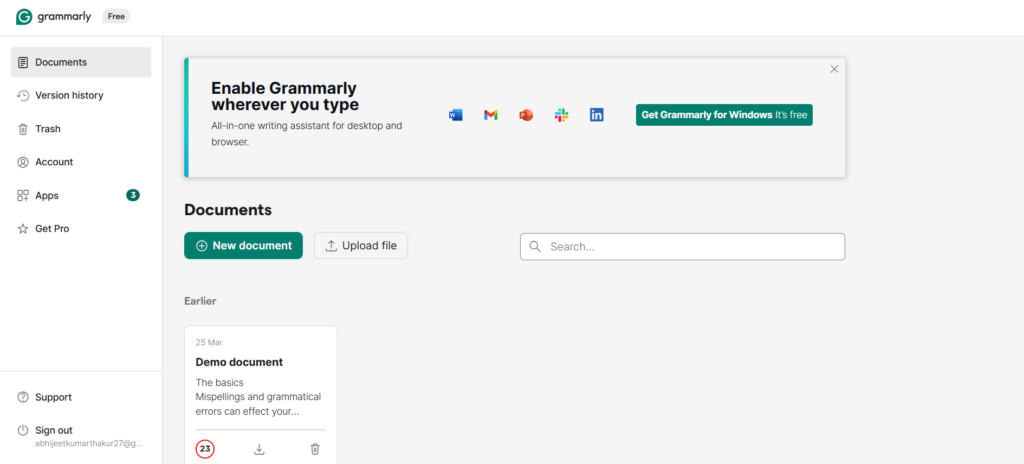
My current post jumps straight into the features, but I haven’t shared how I got started with the tool or what my first experience was like.
I could talk about downloading the browser extension, setting up the desktop app, and linking it to my Google Docs and WordPress. I remember being surprised at how quick the setup was—no complicated tutorials or tech headaches.
Adding this would help readers visualize how easy it is to get started and what they can expect in their first hour with the tool.
Grammarly Review: How Does It Work?
Browser Extension: Works on Gmail, Google Docs, LinkedIn, Facebook, and countless other sites.
Desktop & MS Office Integration: Grammarly for Windows, Mac, and Microsoft Office brings corrections to your everyday apps.
Mobile App: The Grammarly keyboard corrects your writing in any SMS, email, or social app.
Web Editor: Copy-paste or upload your documents into the web editor for a full Grammarly review.
Generative AI: Grammarly’s built-in GAI gives you hundreds to thousands of AI prompts with Pro plans.
When writing, Grammarly scans for errors, flags them, explains each rule, and proposes an edit—all in real time.
Who Should Use Grammarly?
Honestly, almost anyone who writes can benefit, but here are some groups who’ll find it especially useful:
Students — for essays, research papers, and presentations.
Professionals — for emails, reports, and proposals.
Content Creators and Bloggers — to keep posts polished and engaging.
Non-native English speakers — to improve grammar and phrasing.
Casual writers and texters — for error-free social media posts and messages.
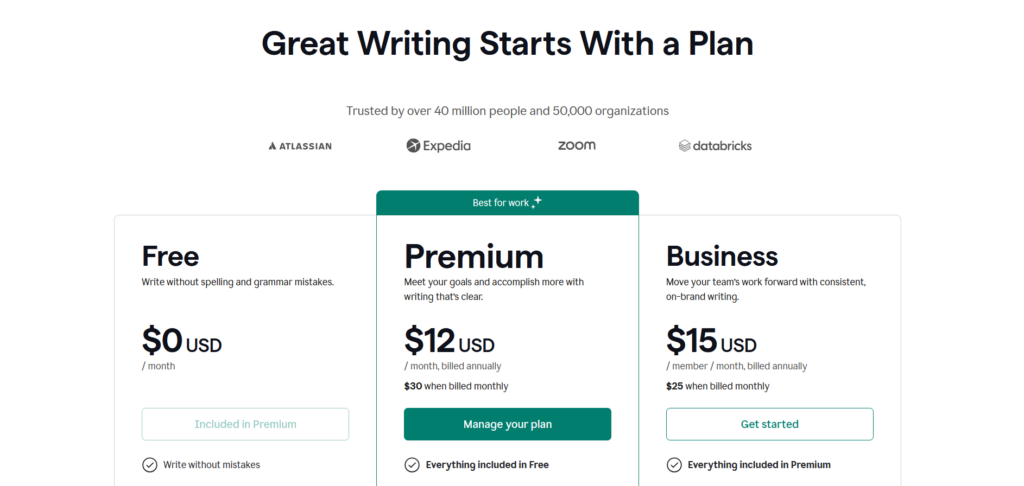
Pricing of Grammarly
Plan
Price (Billed Annually)
Price (Billed Monthly)
Notes
Free
$0 USD / month
N/A
Write without spelling and grammar mistakes
Premium
$12 USD / month
$30 USD / month
Meet your goals and accomplish more with clear writing
Business
$15 USD / member / month
$25 USD / member / month
Move your team’s work forward with consistent, on-brand writing
Team Features (Style Guides, Brand Tones, Analytics)
❌
✅
Note: Grammarly Pro is available for individuals and teams, offering advanced writing features and team collaboration tools.
Key Features: Grammarly Review Deep-Dive 2026
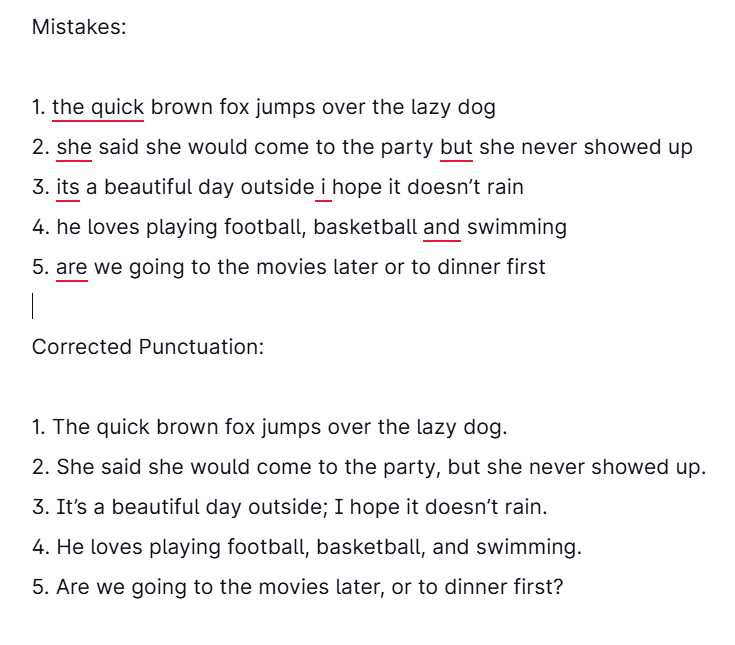
Grammar and Spelling Check
Grammarly offers real-time detection of grammar mistakes, spelling errors, and punctuation problems as you type.
It goes beyond basic checks by identifying errors like incorrect verb tenses, subject-verb agreement, and misuse of articles. It also recognizes when a correctly spelled word is used incorrectly in context, such as confusing “their” with “there.”
Punctuation Correction
Grammarly helps improve your punctuation by suggesting proper placement of commas, semicolons, and colons. It also ensures correct usage of quotation marks and apostrophes, fixing mistakes in contractions and possessive forms.
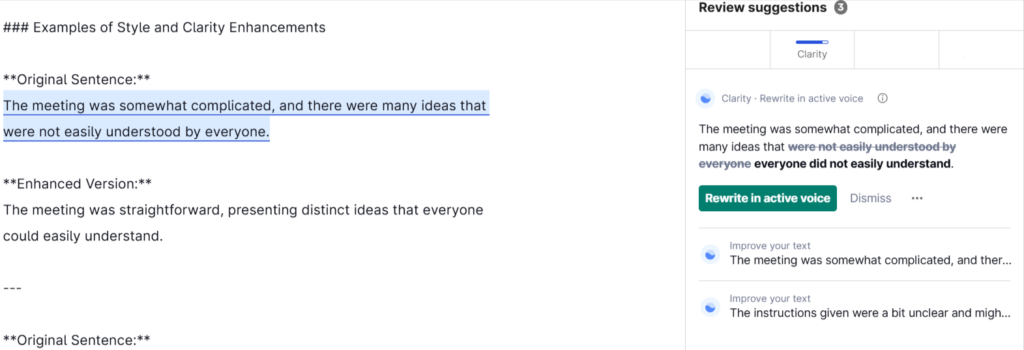
Style and Clarity Enhancements
This feature provides suggestions to make your writing clearer and more concise. It helps you remove unnecessary words and avoid redundancy, improving readability.
Additionally, Grammarly can adjust your writing tone to suit your audience, whether you need a formal, casual, or academic style.
Vocabulary Enhancement
Grammarly recommends better word choices and synonyms to enrich your vocabulary and avoid repetition. It helps diversify your language and ensures your word choice fits the tone you want to convey, whether it’s friendly, confident, or neutral.
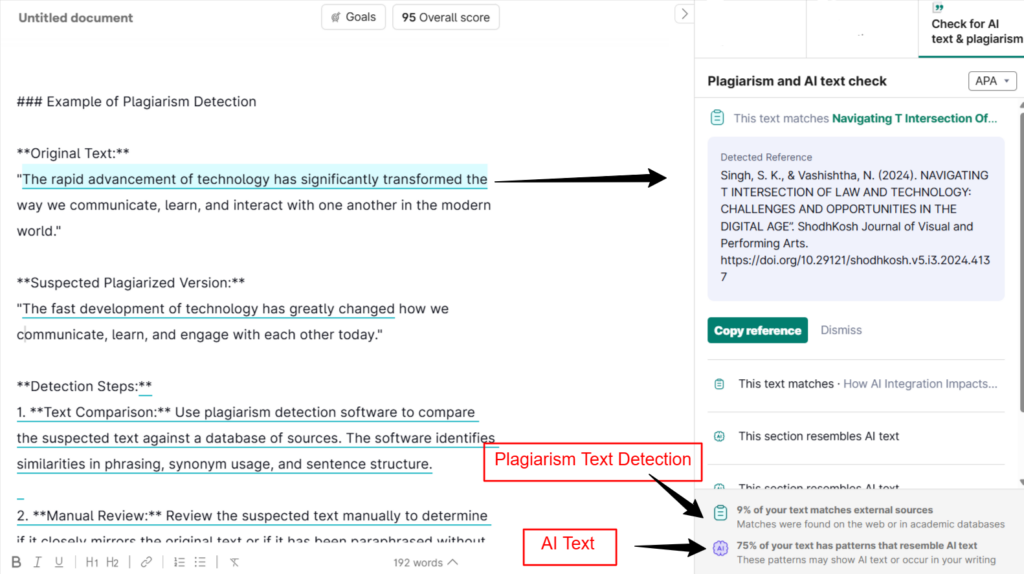
Plagiarism Detection
Grammarly cross-checks your text against billions of web pages and academic sources to detect plagiarism. It alerts you if any part of your writing is unoriginal and may suggest proper citations to give credit where it’s due.
Tone Detector
The tone detector analyzes your writing in real time to show how your message might come across to readers. It identifies tones like friendliness, formality, or optimism and offers suggestions to adjust your tone according to your communication goals.
Integration and Accessibility
Grammarly is accessible through various platforms. It offers browser extensions for Chrome, Firefox, Edge, and Safari, allowing you to check your writing on websites, emails, and social media.
There are also desktop applications for Windows and macOS, a Microsoft Office add-in for Word and Outlook, and a Grammarly Keyboard app for mobile devices.
Additionally, Grammarly provides an online web editor where you can upload or write documents directly for thorough checking.
Writing Goals Customization
You can customize Grammarly based on your writing goals by selecting the purpose of your text (academic, business, creative, casual), the intended audience (general, knowledgeable, expert), and the formality level.
It also adjusts suggestions based on the domain, like technical or academic writing, to tailor the advice to your specific needs.
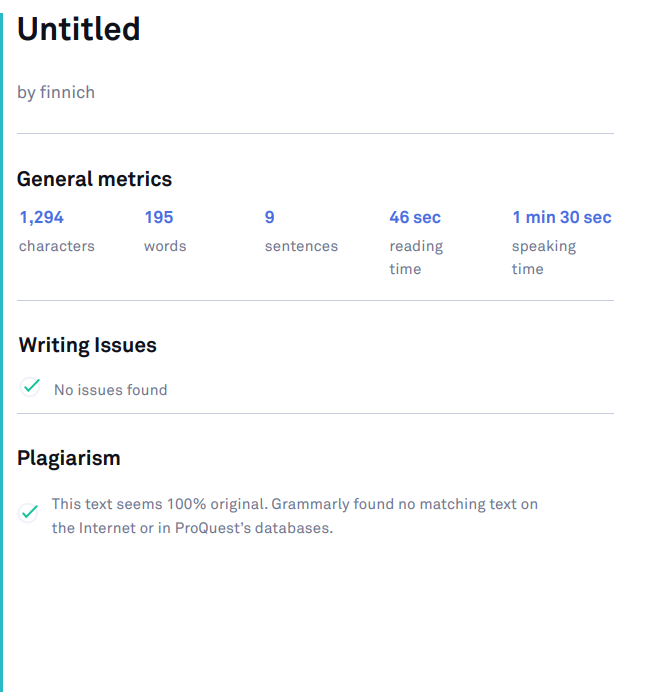
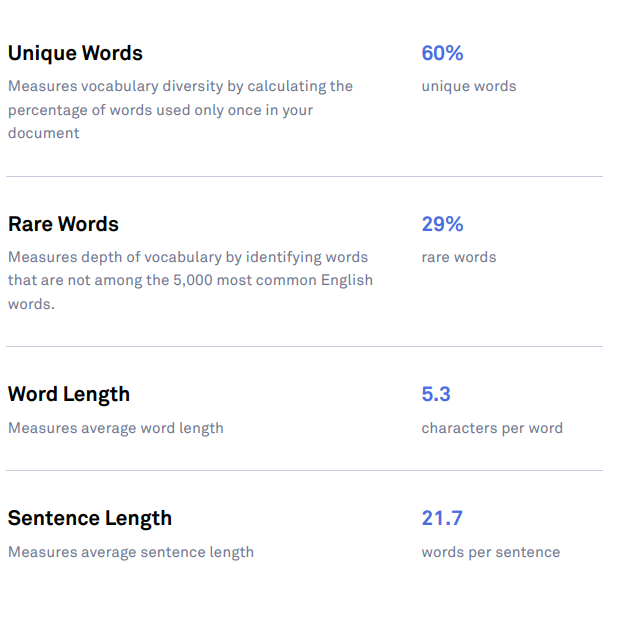
Performance Statistics and Insights
Grammarly provides a writing score that evaluates your overall writing quality. It also includes a readability score to gauge how easy your text is to read, along with statistics on word count and vocabulary variety to help you monitor the diversity and length of your writing.
Additional Premium Features
Premium users gain access to advanced grammar, style, and vocabulary suggestions.
Grammarly can offer sentence rewrites for better flow and clarity, check for consistency in spelling and formatting throughout the document, and tailor suggestions for specific genres such as business emails or academic essays.
My Personal Experience with Grammarly
After using Grammarly daily for several months, here’s what I’ve noticed:
My writing speed has improved because I no longer have to spend extra time proofreading.
I’ve become more confident sending emails and proposals, knowing my grammar and tone are spot on.
I actually learn new grammar tips from the explanations, so it’s an educational tool, not just a correction one.
For blogging, it helps me maintain a consistent style and avoid repetitive words.
The mobile app is great for texting without typos or awkward phrasing.
It’s like having a helpful writing buddy who’s always available and never gets tired!
How I Use It Across Different Types of Content?
Grammarly is a versatile AI-powered writing assistant that adapts to various content types, enhancing clarity, tone, and engagement. Here’s how you can leverage Grammarly across different writing formats:
1. Academic Writing (Essays, Research Papers, Reports)
For academic content, Grammarly aids in:
Clarity and Structure: Ensuring logical flow and coherence.
Formal Tone: Maintaining an academic voice.
Grammar and Syntax: Correcting errors to meet scholarly standards.
Plagiarism Detection: Identifying unintentional similarities with existing works.
Utilize Grammarly’s plagiarism checker and adjust your writing goals to align with academic standards.
2. Professional Communication (Emails, Memos, Proposals)
In professional settings, Grammarly helps you:
Tone Adjustment: Tailoring your message to be formal, neutral, or friendly.
Conciseness: Eliminating unnecessary words for clear communication.
Politeness: Ensuring courteous language.
Formatting: Organizing content for easy readability.
Set specific writing goals in the Grammarly Editor to match the intended tone and style.
3. Web Content (Blogs, Articles, SEO Copy)
For online content, Grammarly assists in:
SEO Optimization: Suggesting keywords and improving readability.
Engagement: Enhancing sentence structure to captivate readers.
Consistency: Maintaining uniformity in style and terminology.
Meta Descriptions: Crafting concise summaries for search engines.
Incorporate Grammarly’s suggestions to refine your content and boost its online presence.
4. Social Media Posts and Captions
For social media content, Grammarly helps you:
Brevity: Conveying messages succinctly.
Tone Consistency: Aligning with your brand’s voice.
Engagement: Crafting compelling calls to action.
Hashtags: Ensuring correct usage and relevance.
Use Grammarly’s tone detection and clarity suggestions to refine your posts.
5. Creative Writing (Stories, Poems, Scripts)
In creative writing, Grammarly assists in:
Voice and Style: Preserving your unique writing style.
Grammar and Punctuation: Correcting errors while maintaining creativity.
Flow: Enhancing sentence structure for better readability.
Consistency: Maintaining character and narrative consistency.
Adjust your writing goals to reflect the creative nature of your work.
6. Business Documents (Reports, Proposals, Presentations)
For business documents, Grammarly helps you:
Clarity and Precision: Ensuring clear and precise language.
Professional Tone: Maintaining a formal and respectful tone.
Structure: Organizing content for logical flow.
Consistency: Ensuring uniformity in terminology and style.
Utilize Grammarly’s advanced suggestions to enhance the quality of your business documents.
Grammarly Review: Pros & Cons
Pros
It helps you adjust your writing tone to be more formal, friendly, or confident depending on your audience.
Grammarly catches a wide range of errors, from simple typos to complex grammar issues.
Scans for duplicate content to ensure originality
Works on browsers, desktop apps, Microsoft Word, and mobile keyboards
Explains the grammar rules behind corrections, helping you learn as you write.
Cons
Advanced features require a subscription.
Grammarly’s suggestions can occasionally make writing sound stiff or overly polished.
FAQ on Grammarly Review
How does Grammarly work?
Grammarly works by analyzing your text as you type, providing instant suggestions and explanations to improve your writing on web browsers, Microsoft Word, and mobile devices.
Can Grammarly detect plagiarism?
Yes, but plagiarism detection is available only in the Pro (premium) subscription.
Is Grammarly safe to use?
Absolutely. Grammarly uses strong encryption to protect your data and respects your privacy.
Can Grammarly help non-native English speakers?
Definitely! Grammarly offers detailed explanations and suggestions, making it a great tool for learning and improving English writing skills.
What is Grammarly?
Grammarly is an AI-powered writing assistant that helps you write clearly, correctly, and confidently by checking grammar, spelling, punctuation, and style in real-time.
Writing is one of those things where small mistakes carry big consequences — a wrong word, a stiff sentence, a tone that reads cold when you meant warm. Grammarly in 2026 catches all of that before it ever reaches your audience. The free plan is genuinely useful, and the Pro tier unlocks the kind of intelligent suggestions that make your writing noticeably sharper.
If you write emails, content, reports, or really anything that other people will read — this tool is worth having in your corner. Try it free, see how it feels, and let your writing do the talking.
Affiliate disclosure: In full transparency – some of the links on our website are affiliate links, if you use them to make a purchase we will earn a commission at no additional cost for you - none whatsoever.
Roshan Jha
Hey there! I'm Roshan Jha, a lifelong learner with a mission to empower others through education. As someone who’s dived headfirst into countless online courses, I know the thrill of finding a great platform and the frustration of stumbling across ones that don’t deliver. That’s why I’m here at Digiexe, reviewing course-selling platforms with honesty and heart, cutting through the hype to reveal which ones are truly legit. My goal? To help you find the right tools to fuel your growth, whether you’re chasing a new skill, a career boost, or just the joy of learning something new. Let’s navigate this journey together!