


In my Kartra Review, I explore this all-in-one marketing platform that simplifies business growth with its seamless tools. From funnel building to email automation, Kartra offers an intuitive solution tailored for entrepreneurs like me. It’s a game-changer for streamlining workflows and effortlessly boosting conversions.
- Combines funnel building, email marketing, and membership sites in one platform.
- Intuitive drag-and-drop builder simplifies creating pages and funnels.
- Behavior-based triggers streamline workflows and save time.
- Track performance across campaigns.
- Offers a variety of pre-built, high-converting designs.
- Replaces multiple tools, reducing overall software costs.
- Robust features can overwhelm beginners
- Customization options are limited
Price: $83/mo
Have you ever felt like your online business is a circus of apps? One for emails, another for funnels, a third for courses… and don’t get me started on the logins. I have 15 tabs open, monthly bills stacking up like Jenga, and still missing that one automation. Enter Kartra.
In this no-BS Kartra review, we’re chatting real talk: my tests, fresh 2026 pricing, features that deliver (and those that don’t), plus stories from creators who’ve ditched the tool jungle. If you’re a coach, marketer, or course hustler dreaming of simplicity, let’s see if Kartra’s the glue you need.
What is Kartra?
Kartra is an all-in-one marketing platform designed to replace multiple software tools by providing everything you need to run an online business in one place.
Kartra is an all-inclusive internet business platform that helps you build, market, and run your business without needing multiple tools. It includes website and landing page builders, email marketing, sales funnels, membership sites, checkout systems, and automation, all in one place.
With Kartra, you can create and sell products, host online courses, manage leads, and automate marketing without hiring a tech team. The drag-and-drop editor makes it simple to design professional websites and landing pages. At the same time, the built-in email system lets you send newsletters, automate follow-ups, and segment your audience.
Kartra also helps businesses boost sales with features like one-click upsells, order bumps, and affiliate management. You can create entire sales funnels that guide visitors from landing on your site to making a purchase.
Security and hosting are handled for you, so you don’t need to worry about technical issues. Kartra also provides analytics and tracking, helping you gain insight into customer behavior and boost your marketing efforts.
If you want a complete business solution without juggling multiple subscriptions, Kartra offers everything in one place to help you grow and automate your online business efficiently.
Instead of using separate tools like ClickFunnels for funnels, Mailchimp for email marketing, and Teachable for course hosting, Kartra lets you do it all under one dashboard.
First Impressions and Getting Started with Kartra
When you first come across Kartra, it feels like someone finally thought through what coaches, creators, and experts actually need to run an online business without juggling a dozen different tools.
The promise is simple: help you turn your knowledge into income, automate the heavy lifting, and give you the tools to grow without feeling overwhelmed.
Getting Started in detail:
One of the best parts of Kartra is how much it focuses on making those first steps easier.
Personalized Onboarding Call: Instead of leaving you to figure everything out on your own, Kartra gives you the option to book a one-on-one call with a specialist. It’s like having a guide sit with you and walk through how to set things up, whether you’re launching your very first product or polishing something you’ve already built. The idea is to get you from “just starting” to “making sales” as quickly as possible.
Live Training Webinars: There are also live training sessions where you can learn directly from experts. These go deeper into strategy, showing you not just how to use the tools, but how to actually build funnels, create campaigns, and grow without burning out.
Tools That Stand Out
Once you start using Kartra, you realize it isn’t just about having all the tools in one place it’s about how smoothly they work together. A few highlights:
- Landing Pages & Websites: You don’t need to be a designer. With hundreds of templates, you can have a polished page ready in minutes.
- Email Marketing: Automated follow-ups and A/B testing mean you can stay connected with leads without writing every message by hand.
- Memberships: Ideal for selling courses or building a community. Kartra even gives you ready-made funnels to get people in the door.
- Form Builder: Clean, customizable forms you can drop anywhere to capture leads when they’re most interested.
- Checkouts: Branded checkout pages with upsells, promotions, and coupon options that actually help boost revenue.
- Kartra AI: Think of this as your built-in copywriting assistant. It can whip up content for emails, pages, and sales copy while still matching your voice.
- Sales Funnels: With drag-and-drop tools and funnel mapping, you can literally see the customer journey and adjust it before you launch.
What makes Kartra appealing is that it doesn’t just hand you tools it gives you a clear path to use them effectively. For $59 a month, you get a system that has already helped tens of thousands of creators launch pages, sell courses, and bring in over a billion dollars collectively.
If you’re someone who’s tired of piecing together websites, email software, payment systems, and design tools, Kartra feels like finally putting all the puzzle pieces in one box.
Kartra Review: Pricing Plans
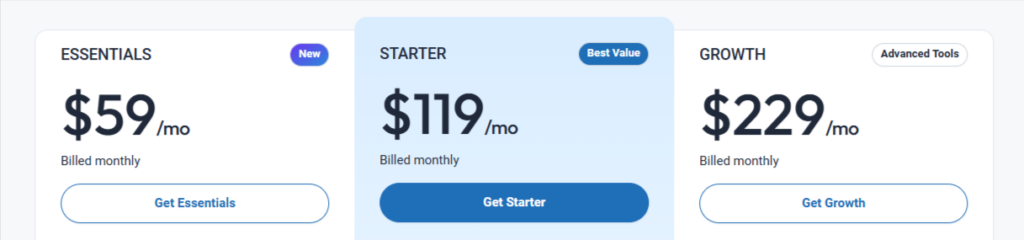
| Plan | Monthly Price | Annual Price (Per Month) | Key Features |
|---|---|---|---|
| Starter | $119 | $89 | Up to 2,500 leads, 1 custom domain, 15,000 emails/mo, 100 pages, 50 videos, 2 membership sites, 1 helpdesk, unlimited funnels, and calendars. |
| Growth | $229 | $174 | Up to 12,500 leads, 3 custom domains, 50,000 emails/mo, unlimited pages, videos, membership sites, funnels, calendars, and helpdesks; advanced analytics. |
| Professional | $549 | $429 | Up to 25,000 leads, 5 custom domains, 100,000 emails/mo, unlimited pages, videos, membership sites, funnels, calendars, and helpdesks; advanced integrations, agency features. |
| Enterprise | Contact Kartra | Contact Kartra | Custom plans for businesses with over 25,000 leads, tailored features, and dedicated support. |
Additional Notes:
- All plans include unlimited funnels, pages, calendars, and helpdesks (except Starter limits membership sites and helpdesks).
- Annual billing saves 25% compared to monthly billing.
- The Enterprise plan requires contacting Kartra for a custom quote, as it’s tailored to specific business needs.
- A 14-day trial is available for $1, covering all plans except Enterprise.
- Features like Kartra Checkouts, Leads, Funnels, Campaigns, and more are included across all plans, with higher tiers offering increased limits and advanced tools like agency features and integrations.
Kartra Refund Policy
Kartra offers a 30-day money-back guarantee for its subscription plans, allowing users to request a refund within 30 days from the initial billing date if they are not satisfied with the service.
To initiate a refund, users must submit a written request through the Kartra support ticket system or by emailing. Refunds are processed to the original payment method within 7-10 business days after approval, though the timeline may vary depending on the payment processor.
This policy applies only to the first subscription period and does not cover renewals, add-ons, or additional services such as domain purchases or third-party integrations.
Refunds for annual plans are prorated based on the unused portion of the subscription, minus any discounts or promotions applied.
Kartra reserves the right to deny refund requests if the account shows signs of abuse, excessive usage, or violation of its terms of service, such as engaging in prohibited activities like spamming or hosting illegal content.
Users are encouraged to review the full terms and conditions on the Kartra website for detailed information.
Who Should Use Kartra? (Real Use Cases)?
Coaches & Course Creators – Sell and manage online courses
Digital Marketers & Agencies – Automate email & sales funnels
E-commerce & SaaS Businesses – Build high-converting checkout pages
If you’re looking for an all-in-one platform that saves time and money, Kartra is definitely worth considering.
Who is Kartra For?
- Solopreneurs & Coaches – Automate sales funnels and client interactions
- Course Creators & Membership Sites – Sell and manage online courses
- Marketing Agencies – Manage multiple clients from one dashboard
- E-commerce Businesses – Sell digital & physical products with checkout pages
Key Features in this Kartra Review
1. Landing Page & Funnel Builder
One of the things I love about Kartra is how easy it is to build sales funnels. The drag-and-drop builder is a lifesaver. I can create landing pages, opt-in forms, and checkout pages without needing a design degree.
They’ve got a ton of templates, which I customize to match my brand’s vibe. I built my first funnel, a lead magnet to email sequence to product pitch in just a few hours, and it looked professional.
The templates are responsive, so my pages look great on mobile, which is huge since most of my audience browses on their phones.
But it’s not all perfect. Sometimes, the page builder feels clunky. For example, aligning elements precisely can be a hassle, and I’ve had moments where I accidentally messed up a section and had to start over because the undo button wasn’t as reliable as I’d hoped.
I also wish there were more advanced customization options for design nerds who want to tweak every pixel without diving into custom code.
Key Benefits:
✔️ Dozens of customizable templates – No need to start from scratch.
✔️ A/B testing – Test different versions of your pages to discover which one performs best.
✔️ Responsive design – Pages look great on both mobile and desktop devices.
2. Email Marketing & Automation
Kartra’s email marketing tools are a big win for me. I can create email sequences, segment my audience, and set up automations without breaking a sweat.
The visual automation builder, where you map out “if this, then that” workflows, is intuitive. I set up a sequence where new subscribers get a welcome email, followed by a series of tips, and then a soft pitch for my course it’s been converting way better than my old email platform.
The analytics are detailed, showing me open rates, click-throughs, and even which links in my emails are getting the most action.
My gripe here is the email editor. It’s functional, but it feels dated compared to some other tools I’ve used. Adding images or formatting text can be finicky, and I’ve spent too much time wrestling with spacing issues.
Also, while the automation is powerful, it took me a while to figure out how to set up complex triggers without watching a bunch of tutorials. A more streamlined interface for emails would make my life easier.
Key Features:
✔️ Automated Email Sequences – Create lead nurturing campaigns effortlessly.
✔️ Advanced Tagging & Segmentation – Send personalized messages based on user actions.
✔️ Built-in A/B Testing – Optimize your email campaigns to achieve better performance.
3. Membership Site Management
I run an online course, so Kartra’s membership site feature was a big draw. Setting up a membership portal was straightforward.
I uploaded my videos, organized them into modules, and added drip content to keep students engaged. The video hosting is solid, and I like that I don’t have to rely on third-party platforms like Vimeo.
Students can leave comments on videos, which adds a nice interactive touch.
However, the membership area could use more flexibility. Customizing the look and feel of the portal is limited unless you’re comfortable with CSS, which I’m not.
Also, I’ve had students mention that the login process feels clunky on their end, especially if they forget their password. A smoother user experience for members would be a game-changer.
What You Receive:
✔️ Various membership tiers – Provide options for free, basic, or VIP access
✔️ Drip content feature – Gradually release content to maintain member engagement
✔️ Custom branding – Ensure a consistent brand image without the need for external tools
4. Affiliate Management System
Running an affiliate program can feel overwhelming, but Kartra takes a lot of that stress off your plate by giving you everything in one simple dashboard.
Instead of piecing together different tools, you can manage the whole process from approving affiliates to paying commissions without leaving the platform.
When someone wants to promote your products, you’re in full control. You can set your own rules, ask affiliates to agree to your terms, and even include a short questionnaire to make sure they’re the right fit.
It’s a smart way to keep your program aligned with your brand and avoid spammy sign-ups.
Once you’ve approved an affiliate, Kartra makes it easy to decide how and when they get paid. You can set flat or percentage-based commissions, hold funds for a reserve period to cover refunds, or release payments in phases.
Affiliates can also be paid through their preferred method, PayPal, bank transfer, or even check.
What I really like is how much insight you get into your affiliates’ performance. Each affiliate has a detailed profile, showing who they are, how much traffic they’re driving, and the sales they’re generating.
With clear analytics like conversions, earnings per click, and total revenue contributed, you can quickly spot your top performers and reward them accordingly.
Kartra even lets you grow your program beyond the basics. You can create multiple tiers of affiliates, offer VIP rates, or bring in joint venture partners who can recruit their affiliates.
And to keep your team motivated, you can design custom landing pages just for them, tag them in your marketing system, and send updates to keep everyone engaged.
Key Features:
✔️ Custom affiliate commissions – Set payout percentages based on sales.
✔️ Affiliate tracking links and dashboards – Monitor your affiliates’ performance.
✔️ Automated payouts – No manual tracking is required.
5. Kartra Helpdesk & Customer Support
Unlike competitors, Kartra includes a built-in helpdesk with:
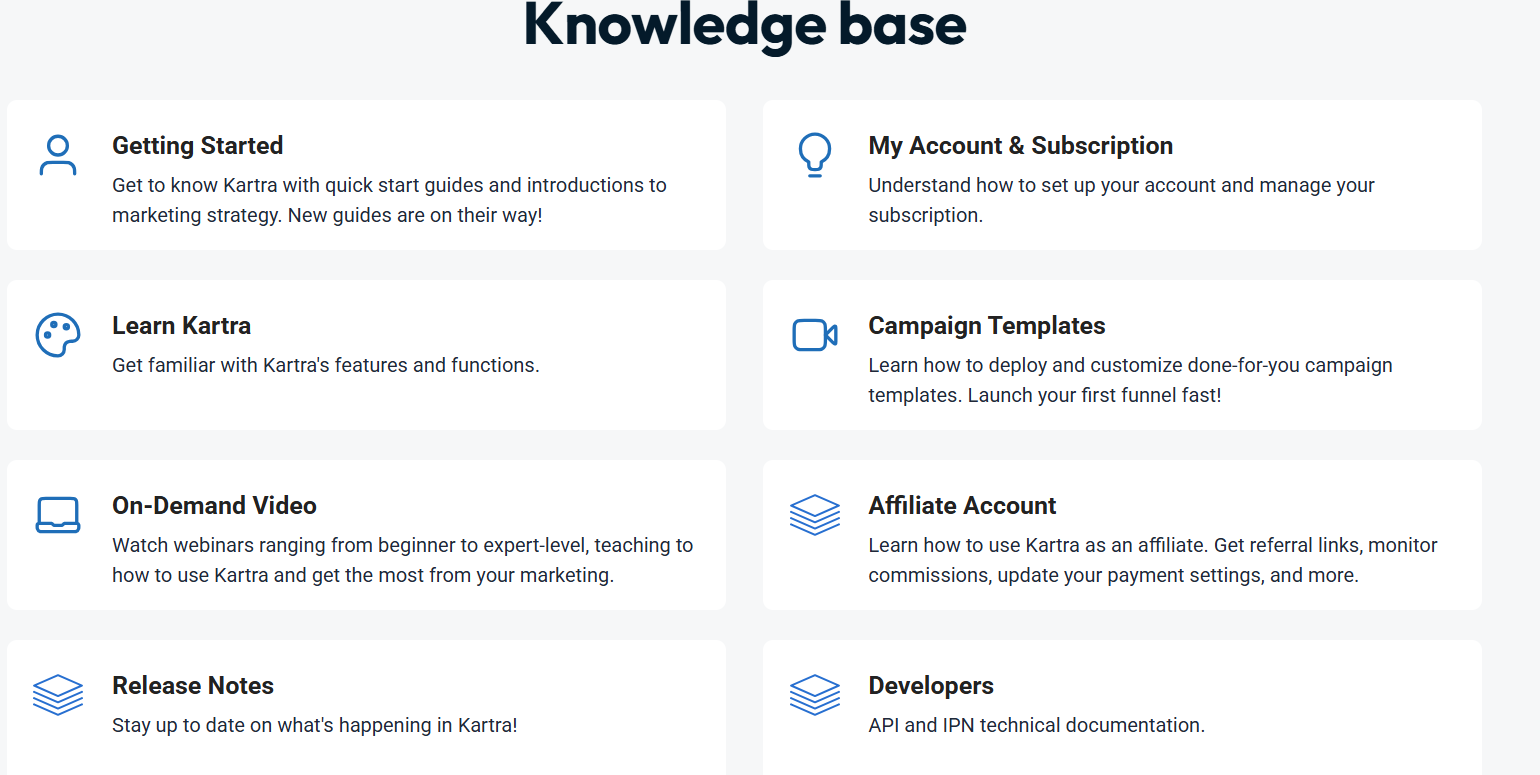
Kartra provides a comprehensive support system designed to assist users with their online business endeavors. The primary entry point for support is their Help Center, which features a search bar allowing users to find answers to their questions quickly.
The support portal includes popular articles, recent articles, and categorized topics to facilitate easy navigation and information discovery.
Key components of Kartra’s support include:
- Knowledge Base: This extensive resource is broken down into various sections. “Getting Started” offers quick start guides and introductions to marketing strategy. “My Account & Subscription” helps users manage their account settings and billing. “Learn Kartra” provides detailed information on the platform’s features and functions. “Campaign Templates” guides users on deploying and customizing pre-built campaigns to launch funnels quickly.
- On-Demand Video: Users can access a library of webinars, ranging from beginner to expert level, which teach how to use Kartra and maximize marketing efforts effectively.
- Affiliate Account Information: A dedicated section helps users understand how to operate as a Kartra affiliate, including managing referral links, monitoring commissions, and updating payment settings.
- Release Notes: Users can stay informed about the latest updates and changes to the Kartra platform through regularly published release notes.
- Developer Documentation: For more technical users, there’s access to API and IPN technical documentation[1].
- Ticket Submission: If users cannot find what they are looking for within the self-help resources, they have the option to submit a ticket to the support team for personalized assistance.
4. Checkout and Payment Integration:
Kartra’s checkout system is another highlight. I can create branded checkout pages with upsells, downsells, and one-click purchases, which have boosted my sales.
Integrating with Stripe and PayPal was seamless, and I love that I can offer payment plans. The analytics let me see how many people abandon their carts, which helps me tweak my offers.
On the downside, I’ve noticed that the checkout pages load a bit slower than I’d like, especially when I add upsells. It’s not a dealbreaker, but in a world where every second counts, it’s something I hope they improve.
Also, the transaction fees on lower-tier plans feel a bit steep, especially if you’re starting.
Pros & Cons: Kartra Review
Pros
- No need for multiple software tools
- Saves time with AI-powered workflows
- Helps grow business through referrals
- No coding required
Cons
- It takes time to master all the features
- More expensive than some alternatives
Integrations & API:
Kartra offers a variety of integrations and APIs to connect with external services, improving its all-in-one platform capabilities.
Native Integrations:
- Payment Gateways: Kartra interacts with payment processors such as Stripe, PayPal, Authorize.Net, and Braintree to ensure smooth transactions.
- Email Gateways: Kartra offers email delivery via SendGrid, Mailgun, Elastic Email, and Postmark. Kartra also offers its own SMTP service, Kartra Mail, eliminating the requirement for third-party email services.
- SMS Gateways: To improve communication, Kartra works with Twilio, Plivo, and Nexmo for SMS marketing.
- Membership Platforms: Kartra’s native Memberships functionality supports content hosting and interacts with platforms such as Kajabi, aMember, Digital Access Pass, OptimizePress, S2Member, and Wishlist Member.
- Hub Connectors: Kartra integrates to Zapier, allowing it to integrate with a variety of different applications.
- Calendar Apps: Kartra Calendars are compatible with Google Calendar and interact with Google Meet and Zoom, making scheduling easier.
Custom Integrations:
For developers seeking tailored solutions, Kartra provides:
- APIs: Kartra supports both inbound and outgoing APIs, allowing you to integrate your Kartra account with custom back-end systems.
- IPN (Instant Payment Notification): When clients make purchases through Kartra Checkouts, Kartra may send real-time notifications to your application, which include complete customer and transaction information.
- Custom Apps: Developers can build custom applications or SaaS products that interact with Kartra and make them available to other customers via Kartra’s Custom App Program.
These integration capabilities enable users to customize and expand their Kartra experience, ensuring seamless operation with various tools and services.
Kartra Review: Support
Kartra provides support to help users use the platform effectively. Start by visiting the Kartra Help Center for quick start guides, account management tips, and detailed articles on features.
If you need personal help, submit a support ticket or use the live chat during available hours. To contact support, log in to your Kartra account and go to the Help Center. If you can’t log in, reset your password or use the “Can’t log in?” option for help.
My Expectations vs Reality with Kartra
When I first signed up for Kartra, my biggest hope was that it would simplify things.
I was tired of juggling different platforms, one for email, another for landing pages, and something else for checkouts. I wanted an all-in-one solution that would cut down on the tech headaches and free me up actually to focus on growing my business.
I expected it to give me efficiency, but I wasn’t sure if it could actually deliver everything it promised.
Reality Check
In many ways, Kartra has delivered more than I thought it would. My funnels are converting better because everything works together smoothly.
Instead of worrying about whether my emails sync with my landing pages or if a checkout link will break, I have the confidence that the system handles it in the background.
That peace of mind alone has saved me hours each week, and it’s allowed me to put more energy into strategy and content rather than tech troubleshooting.
What surprised me, though, was the learning curve. Although Kartra is designed to simplify online business, it still offers a lot of depth, and getting comfortable with all its features took longer than I expected.
Some tools, like the email editor, feel a little clunky at times, and the design options, while good enough for most projects, don’t always allow for the level of customization I’d like. These quirks haven’t been dealbreakers, but they were things I didn’t anticipate when I first signed up.
The Balance
Looking back, Kartra has definitely exceeded my expectations in the areas that matter most: reducing complexity, improving conversions, and helping me scale.
It hasn’t been flawless, and there are moments where I’ve had to adjust my expectations or work around limitations. But overall, the benefits have far outweighed the frustrations.
If anything, the reality is that Kartra gave me what I hoped for: less stress, better results, and a single place to manage my business, just with a few bumps along the way. And honestly, that feels like a fair trade.
FAQs around Kartra Review
Can I host my course on Kartra?
Absolutely. I run my course on Kartra, and the membership portal is easy to set up. Uploading videos and organizing modules is simple, but I wish the design were more customizable.
Does Kartra handle payments well?
The checkout system is slick, with upsells and payment plans that boost sales. Stripe and PayPal integration is seamless, but load times can be slow, and transaction fees on lower plans add up.
How’s Kartra for email marketing?
It’s powerful, with great automation and segmentation. I’ve seen better conversion rates since switching. The email editor is somewhat clunky, and formatting can be a hassle.
Can I scale my business with Kartra?
Definitely, the analytics and funnel tools help me track and grow my audience. Higher-tier plans offer more bandwidth and team accounts, but extra costs for scaling can creep up.
Is there a community for Kartra users?
There’s a forum where users share tips, which I’ve found useful. It’s not super active, though, so I wish there were more community engagement or events to connect with others.
Does Kartra integrate with other tools?
Yes! It integrates with Zapier, PayPal, Stripe, and more.
4. What is the refund policy for Kartra?
Kartra offers a 30-day money-back guarantee if you’re not satisfied.
1. Can I try Kartra for free?
Yes! Kartra offers a 14-day trial for just $1.
2. Does Kartra integrate with other tools?
Yes! It integrates with Zapier, PayPal, Stripe, and more.
3. Is Kartra beginner-friendly?
It has a learning curve, but once you get the hang of it, it’s very user-friendly.
4. What is the refund policy for Kartra?
Kartra offers a 30-day money-back guarantee if you’re not satisfied.
Quick Links
- Kartra Alternatives
- Thinkific Coupon Codes
- Deadline Funnel Review
- Jungle Scout vs ASINspector
- Kartra Coupon Codes
- Thinkific Coupon Codes
Final Verdict on Kartra Review: Is Kartra Worth It?
After using Kartra for several months, I can confidently say that it’s a powerful all-in-one marketing platform. If you’re tired of managing multiple tools, Kartra can simplify your workflow and boost your business’s efficiency.
Bottom line in this Kartra review is, would I recommend it? Yes, but only if you plan to use multiple features. If you need a funnel builder, ClickFunnels may be a better option. But if you want a complete business solution, Kartra is the best choice.
