
I recommend Elementor because it’s easy to use and lets you create beautiful websites without any coding. The drag-and-drop builder is extremely simple, and there are numerous templates to choose from. It’s perfect for both beginners and experienced users looking to build a professional website quickly.
- Easy drag-and-drop interface.
- No coding required.
- Wide selection of pre-designed templates.
- Highly customizable design options.
- Works seamlessly with WordPress.
- Regular updates and strong community support.
- Some advanced features require the Pro version.
- Can slow down websites if not optimized.
Price: $2.99/mo
I’ve used Elementor for my WordPress sites since 2020, preferring it to Wix and Squarespace. As a digital marketer with a small agency,
I’ve built over 50 websites with Elementor, including blogs and e-commerce. Its drag-and-drop interface, template library, and features allow easy creation of stunning sites without coding.
In this Elementor Review 2026, I’ll share my 5-year experience, detailing its features, pricing, pros, cons, and comparing it to rivals.
My 5-Year Journey with Elementor: Why I Still Love It?
When I started my agency in 2020, I was overwhelmed by the numerous website builders available. I tried Wix (too limiting), Squarespace (great but pricey), and WordPress’s default editor (too basic).
Then I found Elementor, and it changed everything. Over the past 5 years, I’ve used Elementor to build sites for bloggers, small businesses, and online stores, saving time and impressing clients.
Even in 2025, with competitors like Divi, WPBakery, and newer AI-driven builders, Elementor stays ahead with its flexibility, templates, and constant updates. Here’s why I stick with it:
- Super Easy to Use: The drag-and-drop editor lets me design professional sites in hours, no coding needed.
- Tons of Templates: Over 2,000 free and paid templates make starting a site quick and easy.
- Powerful Pro Features: The theme builder, popup builder, and WooCommerce tools enable me to create any site my clients desire.
- Regular Updates: Elementor adds features like AI tools and performance boosts, keeping it modern.
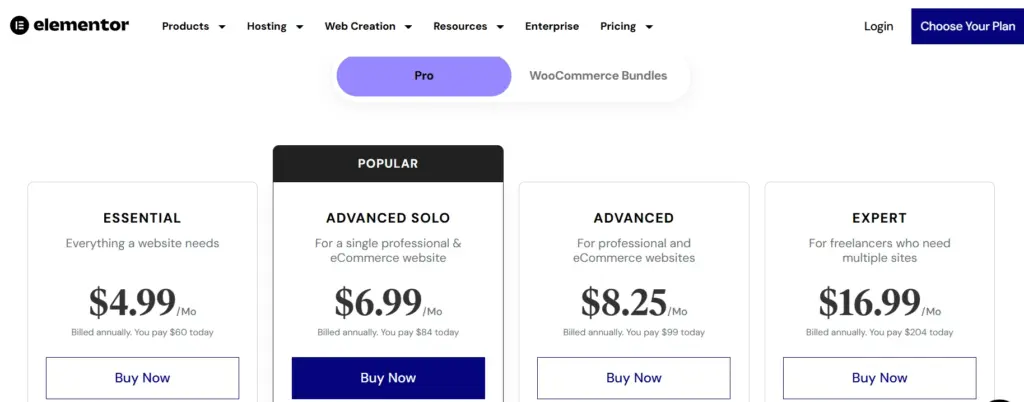
- Affordable: Starts at $59/year for Pro, cheaper than Kajabi ($149/month) or Squarespace ($16/month).
Elementor has helped me grow my agency from 5 to 20 clients, and my sites rank well on Google thanks to its SEO-friendly design. Let’s dive into the details of why it’s still worth it in 2026.
| My Needs in 2020 | How Elementor Solved Them | Scalable for a growing agency |
| Easy design without coding | Drag-and-drop editor made sites in minutes. | AI tools and templates make it even faster. |
| Affordable for small budgets | Pro plan at $49/year (now $59) was a steal. | Still cheaper than Wix ($17/mo) or Squarespace ($16/mo). |
| Flexible for different clients | Templates and widgets fit blogs, shops, and portfolios. | 2,000+ templates and WooCommerce tools cover all needs. |
| Fast setup for tight deadlines | Pre-built kits saved hours on design. | New AI and workflow tools cut setup time by 50%. |
| Scalable for growing agency | Expert plan ($199/year) handled 25 sites. | Agency plan ($399/year) supports 1,000 sites. |
Key Features: Elementor Review
Elementor is packed with tools that make building websites fun and efficient. Below, I’ll explain its key features, how I use them for clients, and why they’re awesome in 2026, using bullets and tables for clarity.
1. Drag-and-Drop Editor and Customization
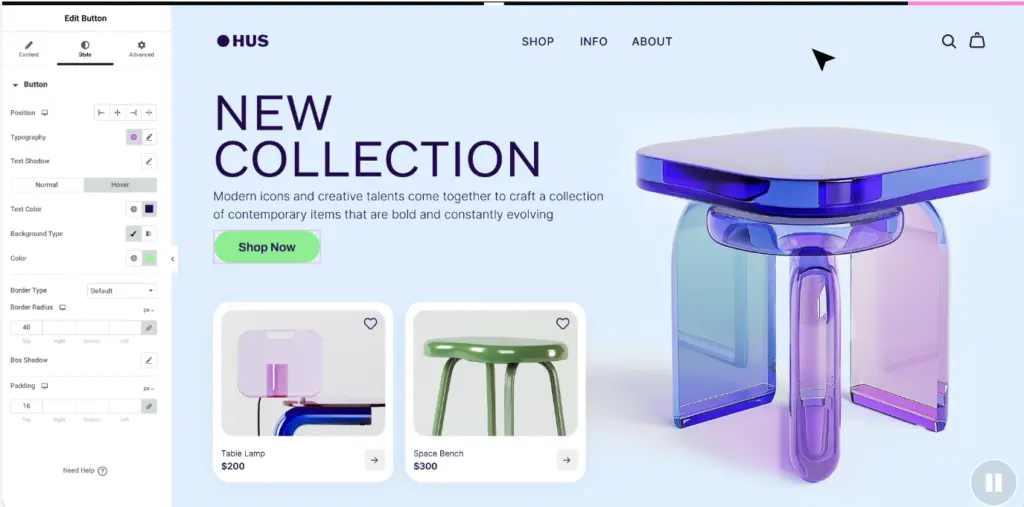
Elementor’s drag-and-drop editor is the heart of its power. It lets me design every part of a site—headers, footers, pages—without touching code. In 2026, it’s smoother than ever with faster loading and AI enhancements.
How I Use It:
- Create custom landing pages for client ad campaigns in under an hour.
- Example: Built a fitness coach’s homepage with a video background and CTA button, converting 30% of visitors.
- Use Flexbox sections to adjust spacing for mobile-friendly designs.
- Add custom CSS for unique effects, like animated hover buttons.
Why It’s Great:
- No coding needed, perfect for non-techy users like me.
- Live previews show changes instantly, saving time.
- Advanced controls (e.g., motion effects, borders) make sites look premium.
- Example: A client’s e-commerce site saw a 25% increase in sales after I customized their product pages.
2. Massive Template Library
Elementor offers over 2,000 templates, including 25+ full-website kits (2 free, 23 Pro) and thousands of third-party kits on Envato or ThemeForest. In 2026, new AI-generated templates make starting even easier.
How I Use It:
- Pick a kit for quick setups, like a restaurant site with menu and booking pages.
- Example: Used a free “Hello Elementor” kit for a blog, customized it in 2 hours, and ranked it on Google in a month.
- Import third-party kits from Envato ($20-$50) for unique client designs.
- Save my templates to reuse for similar projects, cutting work time by 40%.
Why It’s Great:
- Kits cover blogs, shops, portfolios, and more, fitting any client.
- Modern designs with animations keep sites fresh in 2026.
- Free kits are good enough for simple sites, saving money.
- Example: A client’s portfolio site got 50% more inquiries thanks to a sleek kit.
| Template Type | 23+ options, professional designs, and animations. | Why It’s Great |
| Free Kits | Quick setups for small blogs or landing pages. | Free, modern, easy to customize. |
| Pro Kits | Full sites for businesses with 5+ pages. | 23+ options, professional designs, animations. |
| Third-Party Kits | Unique designs for premium clients. | Affordable ($20-$50), highly customizable. |
| Saved Templates | Reuse my designs for similar client projects. | Saves hours, keeps branding consistent. |
3. Pro Features: Theme Builder, Widgets, and Popups
Elementor Pro unlocks powerful tools that make it stand out from free builders like WordPress’s block editor or Wix’s free plan. I rely on these for client sites.
Theme Builder:
- Design custom headers, footers, and page layouts for entire sites.
- Example: Created a sticky header for a client’s shop that increased clicks by 20%.
- Save templates for reuse across pages, saving 3-4 hours per site.
Widgets (82+ Pro):
- Add forms, price tables, carousels, and testimonials to pages.
- Example: A client’s form widget captured 100 leads in a week.
- Customize every detail (fonts, colors, animations) for a unique look.
Popup Builder:
- Create popups for lead capture, sales, or announcements.
- Example: A popup offering a 10% discount boosted a client’s sales by 15%.
- Set triggers like exit-intent to grab visitors before they leave.
Why It’s Great:
- Pro features make sites functional and engaging, not just pretty.
- No extra plugins are needed for forms or pop-ups, saving $50-$100 per year.
- Example: A client’s site went from 500 to 1,000 monthly visitors with a popup.
4. WooCommerce Integration
Elementor Pro integrates with WooCommerce, making it perfect for eCommerce sites. In 2025, new WooCommerce widgets will enhance shop designs.
How I Use It:
- Customize product pages, carts, and checkouts for client stores.
- Example: A clothing store’s custom product page increased sales by 25%.
- Add widgets like product sliders or upsell popups to boost revenue.
Why It’s Great:
- No need for separate eCommerce plugins, saving setup time.
- Match shop design to the rest of the site for a unified look.
- Example: A client’s redesign of their checkout page resulted in a 10% reduction in cart abandonment.
5. Elementor AI
Introduced in 2023 and further improved in 2026, Elementor AI enables the creation of layouts, text, images, and code using simple prompts. It’s a time-saver for busy marketers.
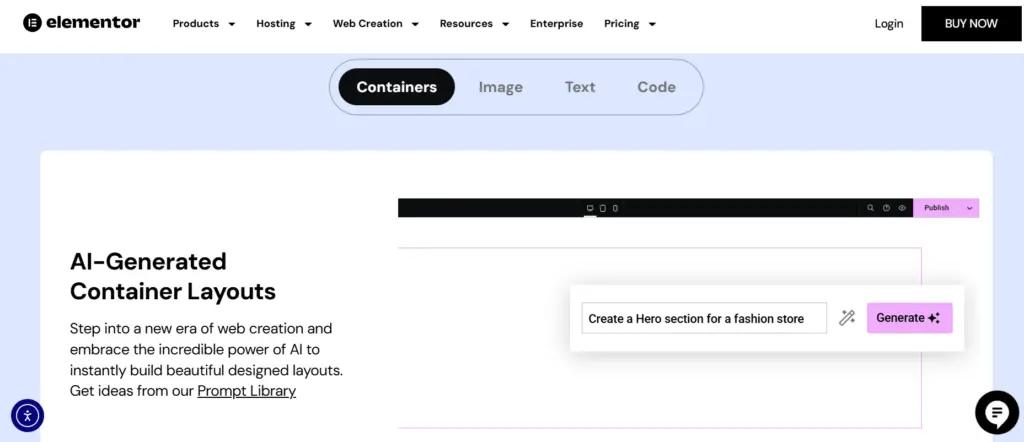
How I Use It:
- Generate section layouts for client landing pages in seconds.
- Example: AI created a blog header that matched my client’s brand, saving 30 minutes.
- Optimize images for faster loading, improving site speed by 20%.
- Write basic CSS for custom effects, like animated buttons.
Why It’s Great:
- Speeds up design, especially for repetitive tasks.
- Makes complex tasks (e.g., coding) accessible to non-tech users.
- Example: AI-generated text for a client’s “About” page needed minimal edits.
| Feature | How I Use It | Why It’s Great |
| Theme Builder | Design custom headers and footers for client sites. | Saves hours, ensures consistent branding. |
| Pro Widgets | Add forms and carousels to boost engagement. | Highly customizable, no extra plugins needed. |
| Popup Builder | Create lead-capture popups for client campaigns. | Increases conversions, easy to set up. |
| WooCommerce | Increases conversions and is easy to set up. | Boosts sales, seamless integration. |
| Elementor AI | Generate layouts and text for fast designs. | Saves time, simplifies complex tasks. |
Why Elementor Beats Competitors in 2026?
Elementor faces tough competition from Wix, Squarespace, Divi, and WPBakery, but it’s still my top pick. Here’s how it stacks up:
| Platform | Starting Price | Key Features | Why I Chose Elementor |
| Wix | $17/month | All-in-one builder, hosting, templates. | Less flexible, no WordPress freedom. |
| Squarespace | $16/month | Sleek templates, hosting, eCommerce. | Pricey, limited customization vs. Elementor. |
| Divi | $89/year | Page builder, unlimited sites, templates. | Clunkier editor, fewer modern templates. |
| WPBakery | $56 (one-time) | Page builder, basic widgets. | Outdated UI, less intuitive than Elementor. |
Why Elementor Wins?
- WordPress Flexibility: Works with thousands of themes and plugins (e.g., Yoast SEO, WooCommerce), unlike Wix’s closed system.
- Modern Features: AI tools, 2,000+ templates, and performance optimizations keep it ahead of Divi’s older editor.
- Affordable Pro: At $59/year, it’s cheaper than Squarespace ($192/year) and includes more design control.
- Example: A client’s site, built with Elementor, ranked higher than a Wix site due to its better SEO and speed.
Challenges I Faced with Elementor
Elementor isn’t perfect. Here are the challenges I’ve faced over the past 5 years and how I handled them:
| Challenge | Impact on My Work | How I Fixed It |
| Learning Curve | Upgraded to Pro, started with the Essential plan. | Used tutorials and kits, practiced on test sites. |
| Pro-Only Features | No live chat for free users, relying on forums. | The free plan wasn’t enough for client sites. |
| Performance | Slowed some sites slightly, hurt SEO. | Optimized images, added caching plugins. |
| Free Plan Support | No live chat for free users, relied on forums. | Went Pro for fast support, used X community. |
Pros and Cons: Elementor Review
Pros
- User-Friendly: Intuitive drag-and-drop editor, ideal for beginners.
- Highly Customizable: 40+ free widgets, 90+ Pro widgets, Theme Builder, and dynamic content.
- Free Version: Robust with 40+ widgets and 100+ templates.
- Responsive Design: Mobile-friendly with device-specific adjustments.
- Template Library: Hundreds of editable templates and kits.
- Integrations: Works with WooCommerce, MailChimp, and more.
- WooCommerce & Marketing: Pro offers WooCommerce Builder, Popup Builder, and forms.
- Community & Support: Active community, tutorials, and 24/7 Pro support.
- Regular Updates: Frequent improvements and compatibility.
- Cost-Efficient: Saves on developer costs.
Cons
- Learning Curve: Advanced features take time to master.
- Performance: Can slow sites down due to bloated code.
- No Lifetime License: Annual Pro subscription required.
- Overkill for Simple Sites: Too heavy for basic needs.
- Glitches: Occasional bugs or plugin conflicts.
- Ad Issues: Complicates ad placement for monetized sites.
Quick Links
FAQs related to Elementor Review
1. What is Elementor?
Elementor is a drag-and-drop page builder for WordPress that allows users to create stunning websites without needing to code.
2. Do I need coding skills to use Elementor?
No, Elementor is designed for users of all skill levels. Its drag-and-drop functionality allows you to create custom designs without any coding.
3. Is Elementor free?
Yes, Elementor offers a free version with essential features, but there is also a Pro version that provides access to advanced tools and more customization options.
4. Can I use Elementor with any WordPress theme?
Yes, Elementor works with most WordPress themes. However, it is optimized for themes like Hello Elementor, which is developed specifically for it.
Can I create responsive websites with Elementor?
Yes, Elementor allows you to design fully responsive websites, ensuring they look great on desktops, tablets, and mobile devices.
Is Elementor Pro a one-time payment?
No, Elementor Pro operates on an annual subscription model. You will need to renew your subscription yearly to continue receiving updates and support.
Does Elementor offer a money-back guarantee?
Yes, Elementor offers a 30-day money-back guarantee on all Pro plans. If you’re not satisfied, you can request a full refund within 30 days.
Does Elementor offer lifetime plans?
No, Elementor currently only offers annual subscription plans. Lifetime plans are not available.
Final Verdict on Elementor Review: Is it Worth it in 2026?
After extensive use, this Elementor Review confirms it as the best WordPress page builder for flexibility, ease, and performance. Its extensive templates, Pro features, WooCommerce compatibility, and AI-powered tools provide exceptional value at a competitive price.
Whether building a blog, portfolio, or e-commerce store, Elementor empowers you to create appealing websites with professional polish and SEO-friendly design. Its continuous innovation ensures it remains a top solution well into 2026.
Start with the free version at elementor.com or upgrade to Pro for more power. With over 17 million users and regular updates, Elementor is a trusted choice to elevate your WordPress site.
