

Webflow review time, and I’m writing this after actually building on it, not after a twenty-minute demo click-through. I’d heard the mixed opinions everyone hears before trying Webflow: some people call it the most powerful no-code builder on the market, others say the learning curve nearly made them quit before they finished their first page.
Both were partly right, and neither told me what I actually needed to know before committing.
I came from a Squarespace background, where dragging a text box onto a page took about four seconds and never once made me think about how anything actually worked underneath.
My first afternoon in Webflow was the opposite of that. I remember staring at the class panel wondering why a button I’d just styled had somehow inherited three other elements’ formatting, and spending nearly an hour figuring out that I’d nested a div inside another div without meaning to. It wasn’t intuitive the way Squarespace was intuitive.
But by the end of that same week, something clicked, and I understood exactly why people who love this tool really love it. Here’s everything I found: what genuinely earns the reputation, what’s a real pain point, and who should actually build here.
What Webflow Actually Is
Webflow is a visual, no-code website builder that also handles hosting, CMS, and ecommerce natively, so you’re not stitching a design tool to a separate hosting provider to a separate database. What makes it different from something like Wix or Squarespace isn’t the drag-and-drop part, most builders do that now.
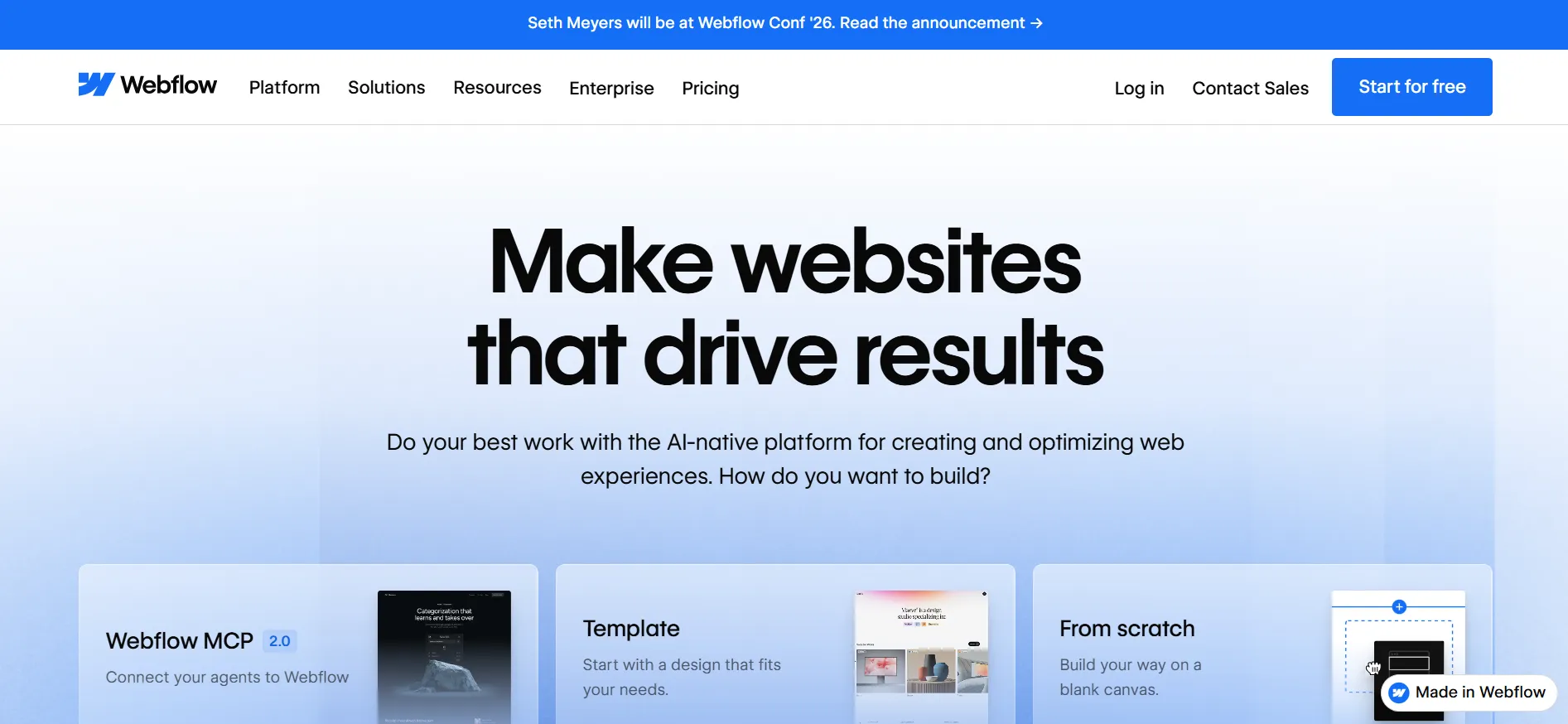
It’s that Webflow exports genuinely clean code underneath the visual editor, and gives you near pixel-level control over layout, spacing, and responsive behavior that simpler builders just don’t expose.
By 2026, Webflow has drawn a clearer line around what it’s actually for. It’s positioned itself firmly as a marketing and content site builder, not a full application platform.
That’s a useful thing to know going in: if you need software with complex logic and user accounts beyond basic memberships, Webflow isn’t trying to be that tool anymore. If you need a fast, design-forward site that can scale with a growing content library, that’s exactly its lane.
What It Actually Costs
Webflow splits pricing into three separate tracks, and understanding this upfront saves a lot of confusion later.
Site plans control what your published website can actually do:
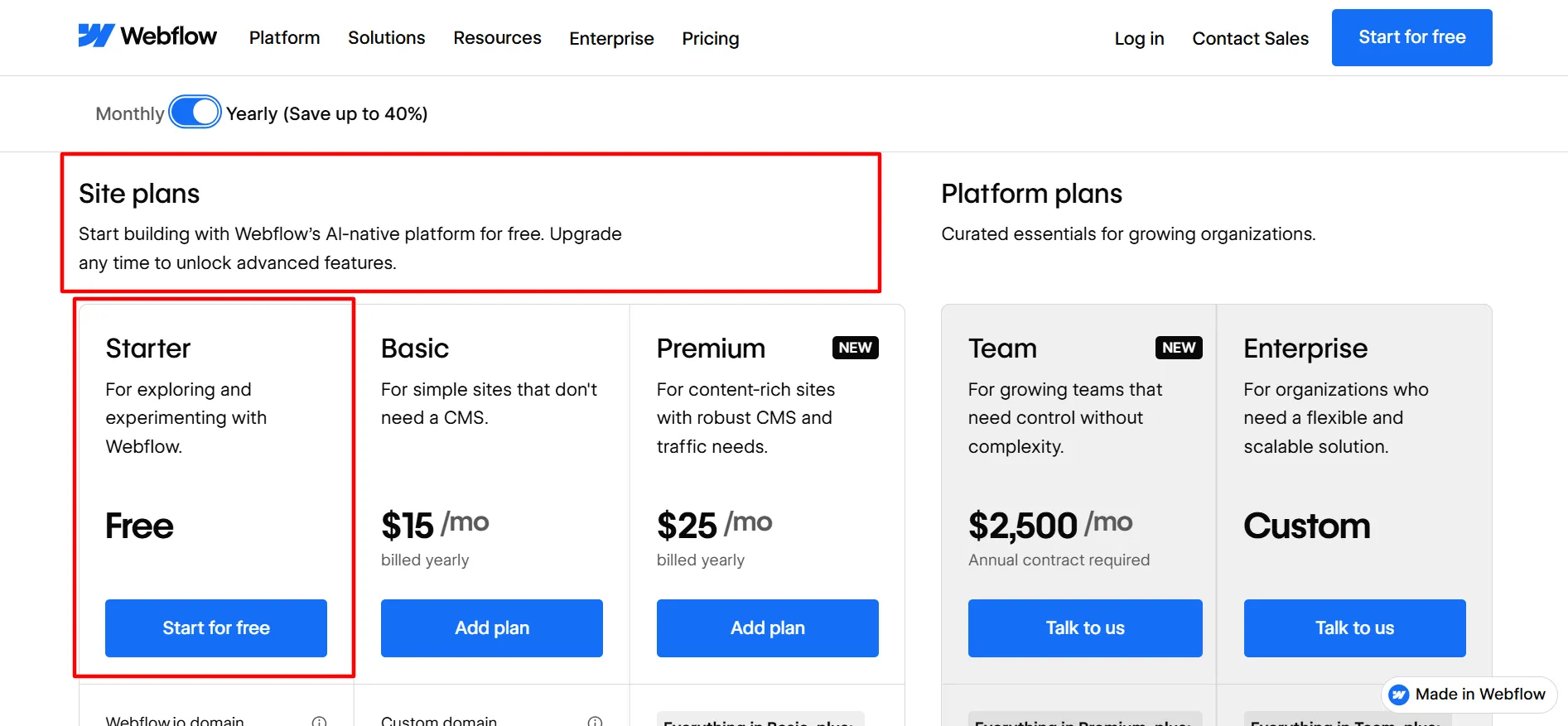
Plan | Price (Annual) | Key Features |
Starter | Free | 2 pages, limited CMS, Webflow.io domain |
Basic | $15/mo | Custom domain, 300 static pages, no CMS |
Premium | $25/mo | Full CMS, 50GB bandwidth |
Ecommerce plans are separate if you’re selling anything:
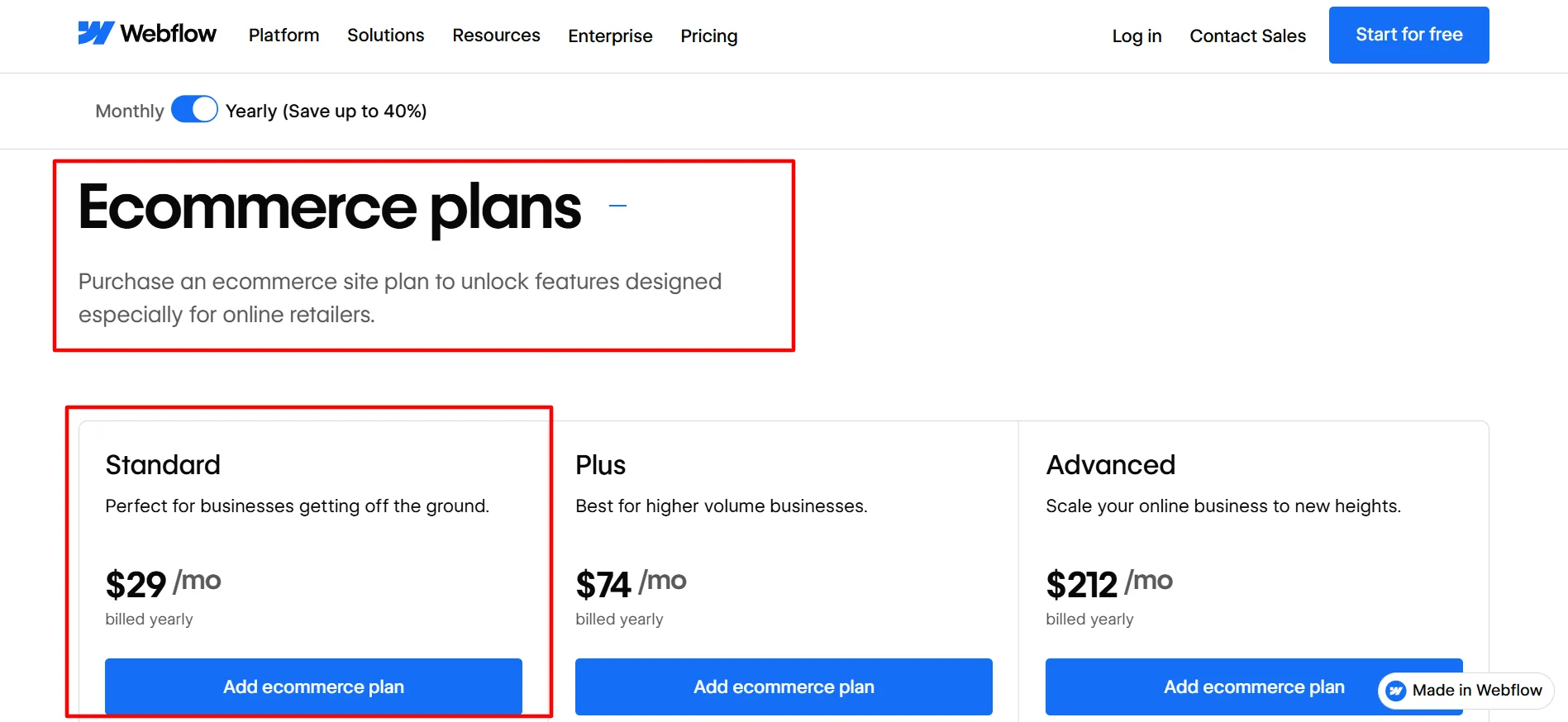
Plan | Price (Annual) | Key Features |
Standard | $29/mo | 500 items, 2% transaction fee |
Plus | $74/mo | 5,000 items, 0% transaction fee |
Advanced | $212/mo | 15,000 items, 0% transaction fee |
Workspace plans are separate again, for team collaboration:
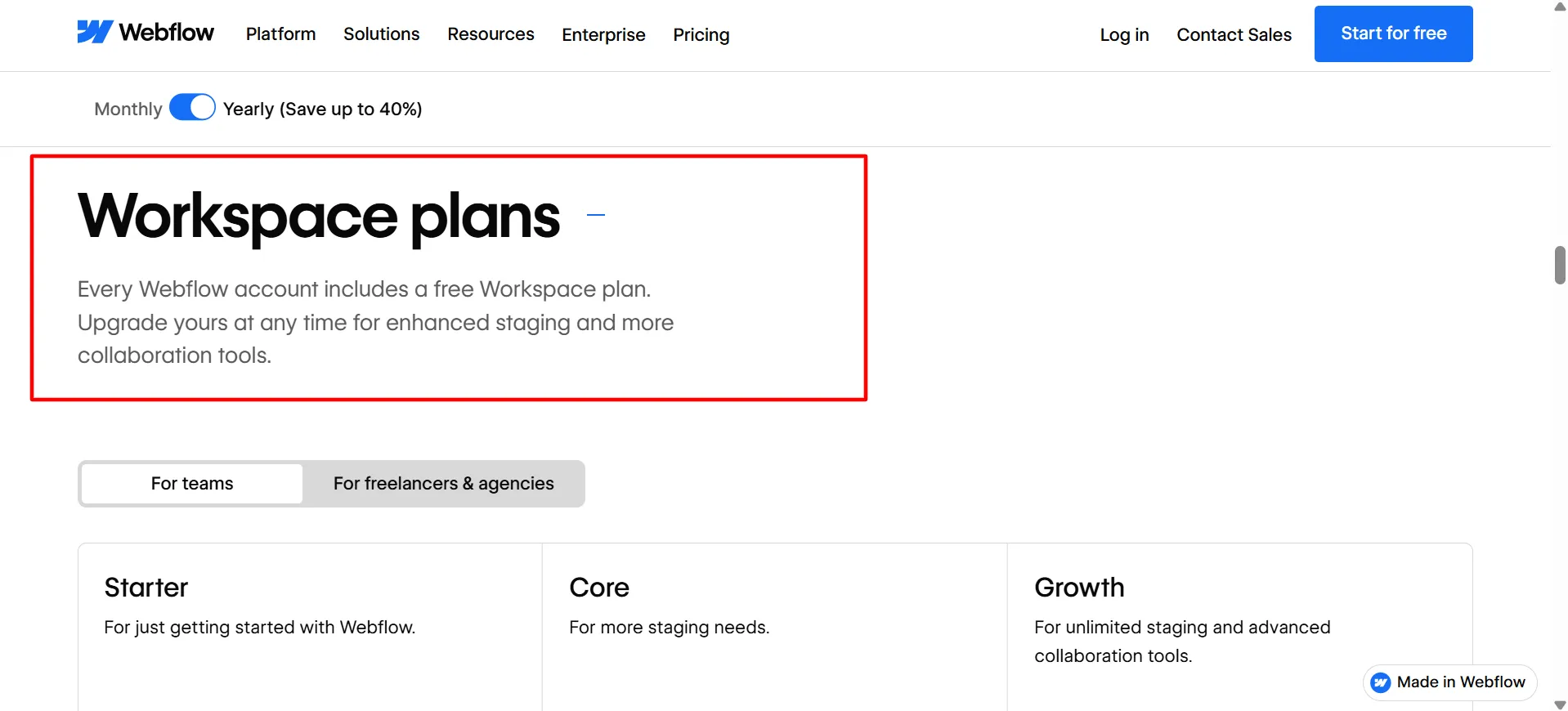
Plan | Price (Annual) | Key Features |
Core | $19/mo | More staging environments |
Growth | $49/mo | Unlimited staging |
Team | $2,500/mo | Enterprise-grade collaboration |
I’ll be honest, this three-track structure confused me for the first few days. I kept expecting one number that told me my total monthly cost, and instead I had to add up a Site plan, potentially an Ecommerce plan, and potentially a Workspace plan separately.
Switching to annual billing saves up to 40% on Site plans and around 35% on Workspace plans automatically, no code needed, which softened the sticker shock once I actually committed.
The number that mattered most to me was Basic’s missing CMS. I’d assumed the cheap plan would cover a simple blog. It doesn’t. Basic has no CMS at all, so the moment your site needs dynamic content, you’re on Premium regardless of how “simple” the rest of the site looks.
The Page Builder, In Detail
This is where I understood the hype. The visual editor gives you control over layout, spacing, and responsive breakpoints at a level I genuinely hadn’t seen in a drag-and-drop tool before.
Classes work similarly to CSS classes, style something once, reuse it everywhere, update it once and every instance changes. Once I understood that system, building pages sped up dramatically because I wasn’t restyling the same button five separate times across five separate pages.
The tradeoff, and it’s real, is that this power comes with genuine complexity underneath. Redirects, custom code injections, and some of the more advanced integration settings didn’t feel intuitive to me, even after weeks of daily use.
I found myself checking desktop, tablet, and mobile views separately after nearly every meaningful change, because a layout that looked perfect on desktop occasionally broke in ways I didn’t expect on mobile.
That’s not a bug exactly, it’s the cost of the control the tool gives you. Simpler builders hide that complexity by taking the control away from you first.
The CMS
Webflow’s CMS is genuinely strong for content-heavy sites, blogs, case study libraries, portfolio listings, anything with a repeating structure.
I moved a client’s blog over from a separate CMS entirely, and the ability to define custom fields and have them populate consistently across templated pages saved real time compared to manually building each post as its own page.
Where I hit a wall was item limits on the lower tiers. If you’re running a large content-driven project, hitting a CMS item cap is a real possibility, and there’s no built-in version history for CMS content either, only for design elements.
I learned that the hard way after accidentally overwriting a published blog post’s content and having no way to roll it back beyond manually rebuilding it from memory.
Ecommerce
I tested Webflow’s ecommerce tools on a small side project rather than a full store, and my honest read matches most of what I found in other reviews: it’s solid, but not built for complex stores.
Multi-currency support is limited, there’s no native subscription billing, and customer accounts exist only through the separate Memberships feature rather than as a built-in ecommerce function.
Standard’s 2% transaction fee is worth watching closely too, at real sales volume, that fee alone can cost more than the price jump to Plus, which drops it to 0%.
For a straightforward product catalog without complicated billing needs, it worked fine. For anything closer to a full subscription-based storefront, I’d look elsewhere.
Support and Learning Resources
Webflow’s support runs primarily through documentation, Webflow University (their free training library), and a community forum, rather than heavy live-chat or phone support for lower tiers.
Webflow University genuinely earned my respect here, it’s one of the more thorough free training resources I’ve used for any software tool, with structured lessons that walk through the exact concepts, nesting, classes, CMS collections, that trip up new users most.
That said, support quality feels tiered by plan, which is worth knowing before you commit. Higher Workspace tiers get closer to real human support, while solo creators on lower tiers lean more heavily on self-service documentation and community answers.
I found most of my early questions answered through University lessons and the forum without ever needing a support ticket, but for anything account-specific or billing-related, response times weren’t instant.
The Learning Curve, Honestly
I’m not going to pretend this isn’t real, because it is, and I’d rather tell you that upfront than sell you a fantasy. My first few days involved genuinely fighting the editor: nested divs I didn’t mean to create, styles that inherited in ways I didn’t expect, and simple changes that would’ve taken seconds in Wix or Squarespace requiring real thought in Webflow.
The good news, and this matched my experience closely, is that the curve is steeper at the start than it stays over time. Once the core concepts clicked, mainly how elements nest and how classes cascade, building pages became genuinely intuitive, and I found myself moving faster in Webflow than I ever did in simpler tools, specifically because I wasn’t fighting artificial limitations anymore.
Budget a real weekend to get comfortable, not a single afternoon. If that sounds like more time than you want to invest, that’s a completely valid reason to pick an easier builder instead.
Who I’d Actually Recommend This To
If you’re a designer, agency, or content-heavy business that treats your website as a real asset, not just a digital business card, Webflow is worth the learning investment.
The design control and clean exported code make it a strong choice for anyone handing finished work to clients, and the CMS genuinely handles large content libraries well.
I’d point you elsewhere if you’re a time-pressed solo founder who needs a credible site up this afternoon with zero learning curve, Squarespace or Wix will get you there faster, full stop.
And if what you actually need is a functioning web application with complex user logic rather than a marketing site, Webflow has deliberately stepped away from that use case as of 2026, so look at a purpose-built app platform instead and bring Webflow back only for the marketing pages around it.
Pros and Cons: Webflow Review 2026
Pros
- Genuine pixel-level design control most builders don't offer
- Clean exported code and fast hosting performance
- CMS handles large content libraries well once you understand collections
- Webflow University is one of the better free training resources I've used
- Annual billing discount is automatic, up to 40% off Site plans
Cons
- Real learning curve, expect a weekend, not an afternoon, before it clicks
- Basic plan's missing CMS makes it a poor fit for most real websites
FAQs: Webflow Review 2026
It can work, but go in honest about the learning curve. Webflow University genuinely shortens it, budget a real weekend rather than an afternoon.
No. Basic has no CMS at all. Only Premium and above include Webflow's full CMS functionality.
For straightforward product catalogs, yes. For complex stores needing subscriptions or multi-currency support, it falls short, those needs are better served elsewhere.
My first few days were genuinely frustrating. By the end of week one, the core concepts clicked and things sped up considerably.
The three-track pricing, Site, Ecommerce, and Workspace, adds up fast if you need all three. Also, team seats and AI credits are billed separately on top of any plan.
Not really, not anymore. Webflow has positioned itself specifically as a marketing and content site builder as of 2026, not a full application platform.
Quick Links:
My Verdict: Webflow Review 2026
Webflow earns its reputation as the designer’s choice for a reason, but that reputation comes with real friction I’d rather flag honestly than gloss over. If your project is a marketing or content-driven site and you’re willing to invest a weekend into the core concepts, the design control genuinely pays off, and I don’t think I’d go back to a simpler builder for serious client work at this point.
Premium at $25/mo is where most real websites should land, since Basic’s missing CMS rules it out fast for anything beyond a static landing page.
If you need a working web app rather than a marketing site, or you need something live this afternoon with zero learning investment, Webflow isn’t the right tool for that job anymore, and it’s better to know that going in than to discover it three weeks into a build.
For everyone else building something design-led and content-heavy, it delivered exactly what it promised for me.
