
Magento SEO Services for Faster, Better Ranking Stores
Magento SEO needs more than good products. DigiExe Magento SEO consultants fix the technical problems common on Magento 2 and Adobe Commerce stores, such as duplicate filter URLs, slow pages and weak default settings, then grow rankings for your category and product pages so more shoppers find you on Google.
Why Magento stores need specialist SEO
Magento, now Adobe Commerce, is powerful and flexible, but that flexibility creates SEO problems. Layered navigation can create thousands of duplicate URLs. Pages can be slow. Default meta data is weak, and canonical settings are often left off or set wrongly.
On large catalogues these issues waste Google’s crawl time on pages that should never rank, while your best category and product pages get crawled less often and rank lower than they should.


Magento SEO that fixes the base, then grows rankings
We start with a full technical audit of your store, using a crawl, Search Console data and your Magento settings. We fix what wastes crawl budget and splits ranking signals, speed up your pages and set up clean structured data.
Then we focus on growth: category pages that target real search terms, product pages with unique content, internal links that point authority to the pages that make money and content that earns links.
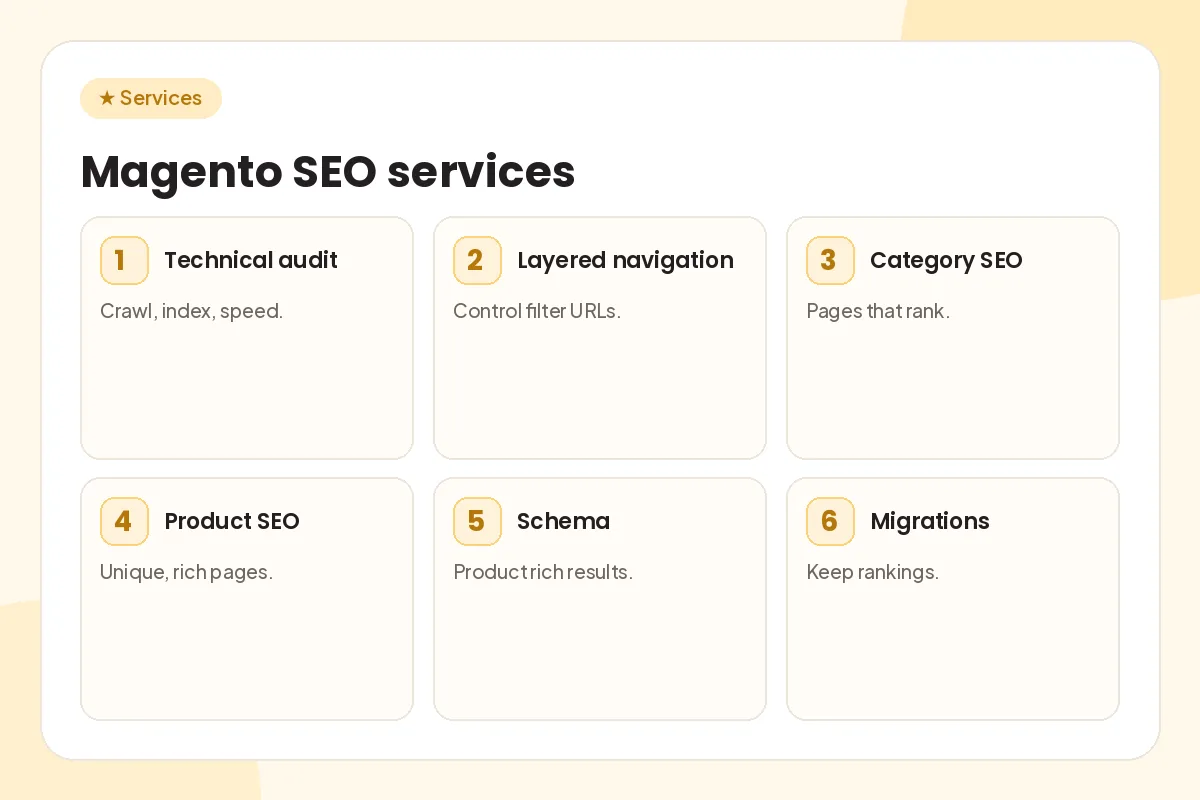
Our Magento SEO services
Technical, on-page and growth work for Magento stores.
Layered navigation control
Category page SEO
Product page SEO
Structured data
Magento SEO guide: the settings to change first
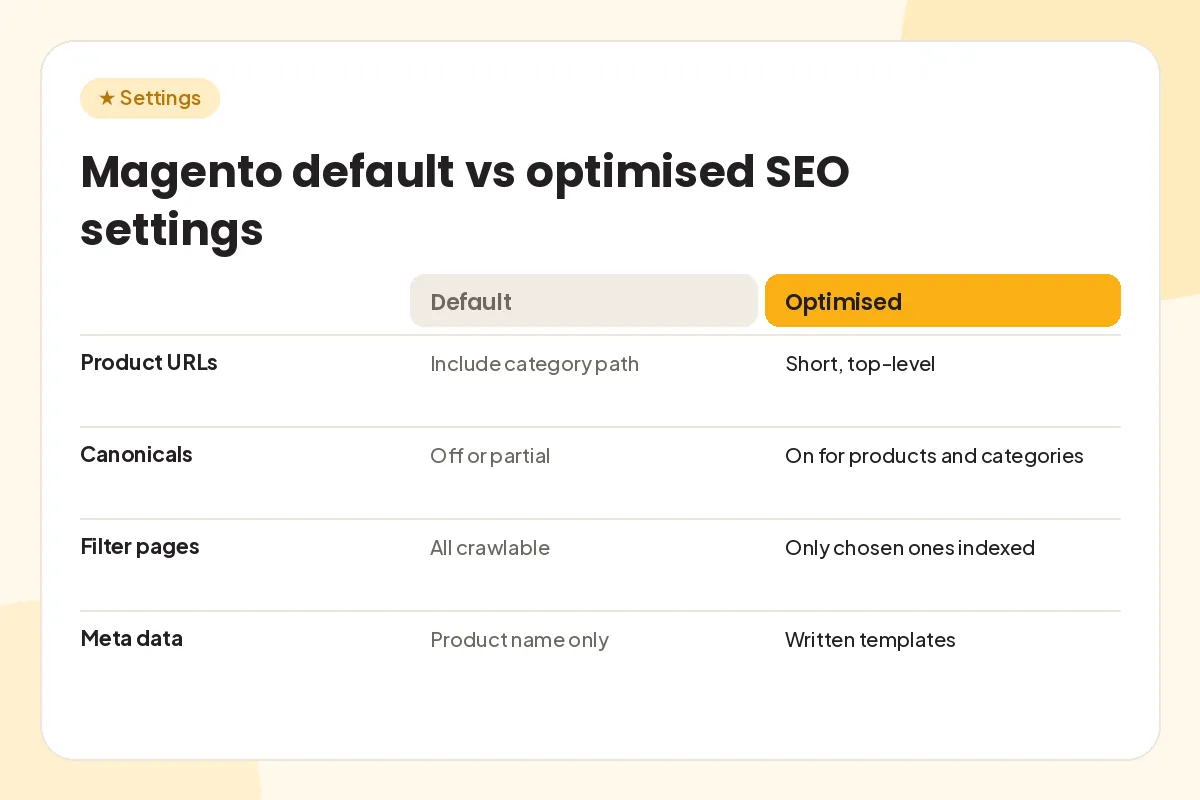
Most Magento stores can make big gains just by changing a few settings in Stores, Configuration, Catalog, Search Engine Optimization. These are the ones we check first on every store:
- Use canonical link meta tag for categories and products: set to Yes.
- Use categories path for product URLs: usually No, so each product has one short URL.
- Product and category URL suffix: keep it consistent, and never change it on a live store without redirects.
- Create permanent redirect for URLs if URL key changed: Yes.
- Use web server rewrites: Yes, to remove index.php from URLs.
We change these on staging, crawl the result and only then apply them to your live store.


How to handle layered navigation in Magento
Layered navigation lets shoppers filter by colour, size, brand and price. Each combination creates a new URL. A category with ten filters can produce thousands of URLs, almost all of them near-duplicates. Google wastes time crawling them, and ranking signals get split.
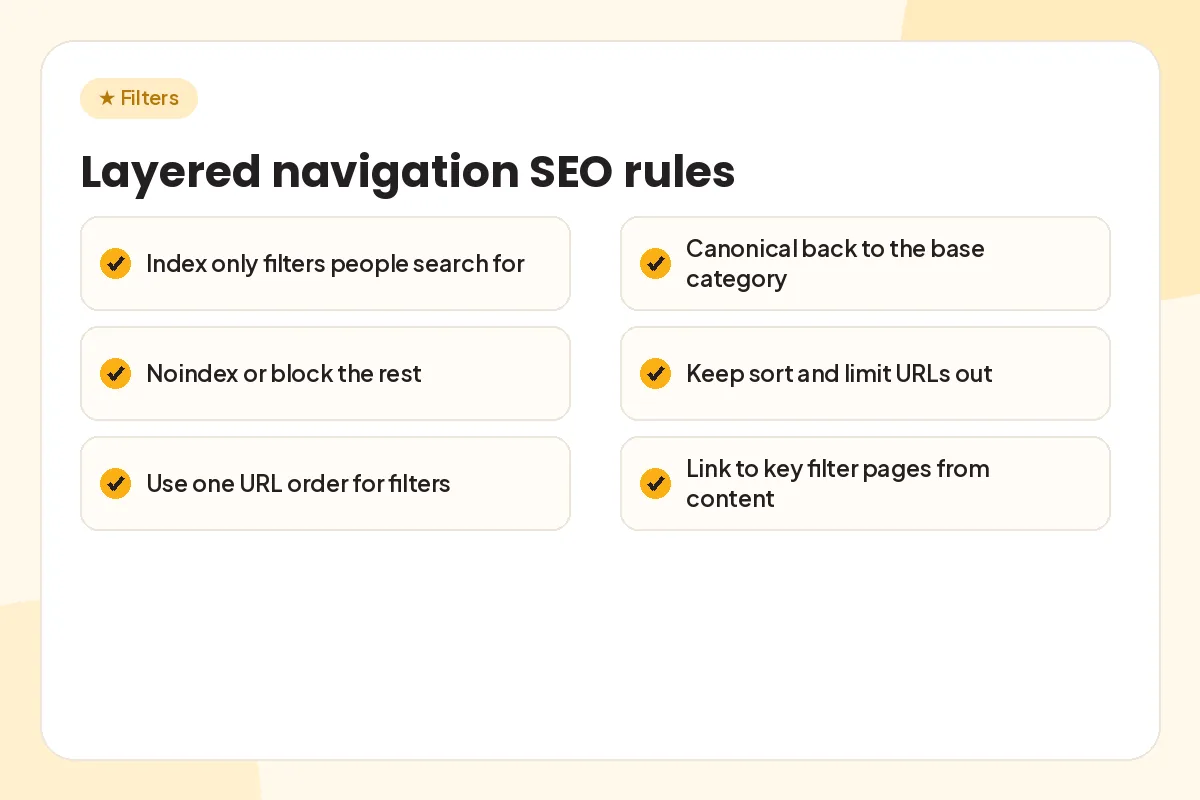
The fix is to decide which filter pages deserve to rank. “Red running shoes” or “Nike running shoes” may have real search demand, so those pages get indexed with their own titles, headings and short copy. Everything else, such as price ranges, sort orders and combinations of three or more filters, gets a noindex tag, a canonical to the base category or is kept out of crawling. Many stores use an SEO extension or a small custom module to manage these rules.
Fixing duplicate content in Magento
Apart from filters, Magento creates duplicates in several other ways: the same product reachable through several category paths, sort and limit parameters, pagination, session IDs, configurable product variants, and separate store views with the same content.
We find these with a crawl and a check of Google’s index, then fix each source: canonical tags, single product URLs, parameter handling, consistent internal links and hreflang for store views in different languages. The goal is simple: one URL for each page you want to rank, and every other version pointing to it.
Magento site speed and Core Web Vitals
Magento can be slow if it is not set up well, and slow stores lose both sales and rankings. Our speed work usually covers:
- Full page cache with Varnish and Redis for sessions and cache.
- Production mode, merged and minified static files and a CDN.
- WebP images, correct sizes and lazy loading below the fold.
- Removing or replacing slow third-party extensions and scripts.
- Fixing slow database queries and keeping indexers and cron healthy.
For a bigger jump, a lighter frontend such as Hyva can cut JavaScript sharply. We measure Core Web Vitals in Search Console and PageSpeed before and after each change.
Category page SEO for Magento
Category pages usually have the most search demand in a store, because shoppers search for types of products, not single items. Yet many Magento category pages have no text, a generic title and a heading that does not match what people search for.
We research keywords for each category, write titles and headings that match, and add short, useful copy above or below the products: what the range includes, how to choose and links to related categories and guides. We also check that the products shown first are the ones most likely to sell, because engagement affects how well a page performs.
Product page SEO for Magento
Product pages win long, specific searches such as model numbers and product names with features. Many stores use the maker’s description, which appears on hundreds of other sites, and leave titles as just the product name.
We set title and description templates that include the product name, key attribute and brand, then write unique copy for your most important products. We add useful details shoppers look for, such as sizes, materials, compatibility and delivery, plus clear images with descriptive alt text. Reviews and questions on the page add fresh, unique content over time.
Handling out-of-stock and discontinued products
Removing products the moment they go out of stock throws away rankings and links. For items that will come back, keep the page live, show it as out of stock and suggest similar products. For discontinued items with links or traffic, redirect to the closest replacement or the parent category. Only let a page return a 404 or 410 when it has no traffic, links or close substitute.
Structured data for Magento stores
Structured data helps Google show prices, stock and ratings in search results, which can raise click-through rates. Magento themes often output incomplete or broken product markup.
We add or fix Product and Offer schema with price, currency, availability and condition, AggregateRating and Review where you have genuine reviews, BreadcrumbList for category paths and Organization for your brand. We test every template in the Rich Results Test and track enhancement reports in Search Console. We never add ratings that are not shown to shoppers on the page.
XML sitemaps and robots.txt in Magento
Magento can generate XML sitemaps, but the defaults often include pages that should not be indexed and miss others. We set your sitemap to include only canonical, indexable category, product and content pages, split it into sensible files for large catalogues, and submit it in Search Console.
In robots.txt, we block crawling of areas that create endless URLs, such as internal search results, checkout, customer accounts and certain parameters, while keeping CSS, JavaScript and images crawlable so Google can render pages properly.

Internal linking for large catalogues
Internal links tell Google which pages matter most. In large Magento stores, top menus often link to dozens of minor categories while important ones sit several clicks deep.
We review your menu, breadcrumbs, category links and related product blocks, then make sure your highest-value categories and products are close to the homepage and linked from relevant content. Guides and blog posts link to the categories they help sell. This sends authority where it earns the most revenue.
Pagination in Magento categories
Large categories split products across several pages. Each paginated page should have its own self-referencing canonical, not one pointing to page one, so Google can find every product. We keep paginated URLs clean, avoid mixing them with sort or limit parameters and make sure product links are real links that Google can follow. For very large categories, better subcategories often help shoppers and SEO more than long pagination.
Magento SEO for several stores and languages
Magento can run several websites and store views from one installation. That is great for business, but it can cause duplicate content and the wrong store showing in the wrong country.
We set hreflang between matching pages in each store view, make sure each store has its own canonical URLs and sitemaps, localise titles, descriptions and category copy instead of copying them, and set up each version in Search Console. Our international SEO team helps choose between subfolders, subdomains or country domains.
SEO for Magento migrations and upgrades
Moving from Magento 1 to Magento 2, from another platform to Magento, or from Magento to something else is where many stores lose rankings. URL structures change, content goes missing and redirects get forgotten.
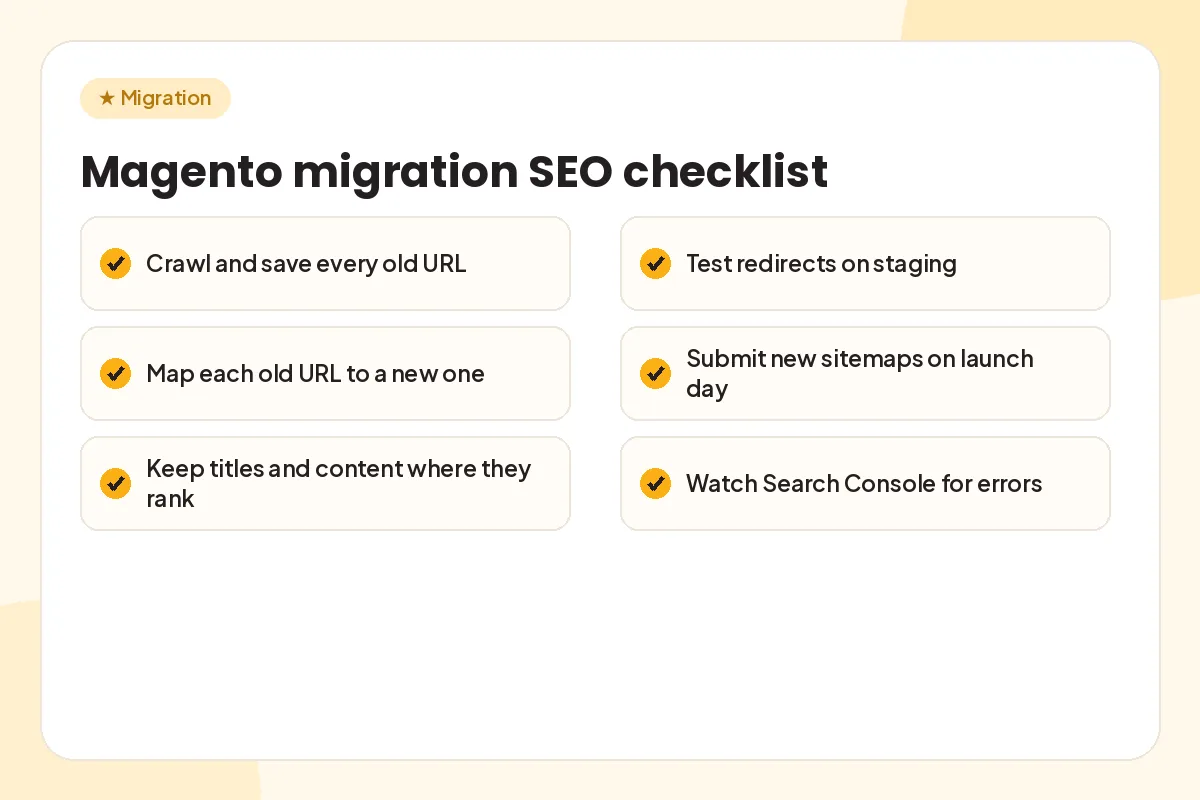
We crawl and save every old URL, map each one to its best new match, keep titles and content on pages that rank, test redirects on staging, launch with new sitemaps and watch Search Console closely for errors in the weeks after. Done carefully, a migration can keep and often improve your traffic.

Content and links for Magento stores
Technical fixes remove what holds you back, but most stores also need content and links to win competitive searches. We create buying guides, comparison pages and how-to content that answer questions shoppers ask before buying, and link them to the right categories.
Good guides also earn links from blogs, forums and media in your niche. We add outreach to relevant sites, supplier and partner links, and digital PR where it fits your budget. Every link is earned, not bought.
Do you need a Magento SEO extension?
Magento covers the basics, but extensions can make some jobs easier, such as rules for layered navigation, meta templates for large catalogues, better sitemaps, hreflang and rich snippets. They can also slow your store or conflict with each other.
We check which of your SEO needs Magento already handles, then suggest one well-supported extension or a small custom module only for the gaps. Fewer extensions usually means a faster, more stable store.
Using Google Search Console for Magento
Search Console shows how Google sees your store. We use the Pages report to find URLs excluded as duplicates or crawled but not indexed, the Performance report to find categories and products close to page one, the Core Web Vitals report for slow templates and the enhancement reports for product markup errors.
We also use crawl stats to see whether Google spends its time on the pages that matter. After fixing layered navigation, many stores see Google crawling far fewer junk URLs and more of their real catalogue.
Common Magento SEO mistakes
- Indexing every filter combination. It creates thousands of thin, duplicate pages.
- Category paths in product URLs. One product ends up with several URLs.
- Changing URL suffixes without redirects. Every page loses its rankings at once.
- Manufacturer descriptions. The same text appears on many other sites.
- Deleting out-of-stock products. Rankings and links are thrown away.
- Too many extensions. Pages get slower with each one added.
- Blocking CSS and JavaScript. Google cannot render pages properly.
Keyword research for Magento catalogues
Ecommerce keyword research works differently from blog research. Shoppers search by product type, brand, model, feature, size, material and use. We group keywords by intent and map each group to one page: broad terms to top categories, attribute terms such as “waterproof hiking boots” to subcategories or chosen filter pages, and model or part numbers to product pages.
We also look at what your customers type into your own site search. Those terms often show demand that keyword tools miss, and they can point to new categories or filter pages worth creating. The result is a keyword map that tells your team which page should rank for what, so pages stop competing with each other.
Image SEO for Magento products
Product images bring traffic from Google Images and Shopping, and they affect page speed more than anything else. We set clear, descriptive file names before upload, add alt text that describes the product and its key feature, serve WebP or AVIF in the right sizes and lazy-load images below the first screen.
For large catalogues, we set alt text templates using product name, colour and brand, then improve the most important products by hand. We also make sure the main product image is in the page code, not loaded only by JavaScript, and that image sitemaps or product markup point Google to the right image.
Internal site search and SEO
Magento’s internal search result pages should not be indexed. They create endless thin URLs and can be abused by spammers who make your site show their search terms. We add noindex to search results and block them from crawling where it is safe to do so.
At the same time, site search data is a gift. If many shoppers search your store for a term with no matching category, that is a sign to create one. We review search terms regularly and turn the strongest into proper category or landing pages that can rank on Google.
Hyva, PWA Studio and headless Magento SEO
Many stores are moving away from the heavy default Luma theme. Hyva keeps normal server-rendered pages and greatly cuts JavaScript, which usually helps both speed and SEO. PWA Studio and other headless setups can be fast too, but they rely on JavaScript to build pages, which brings risks.
For headless stores, we check that every important page is rendered on the server or pre-rendered, that titles, canonicals, structured data and links appear in the first HTML response, and that Google can see the same content shoppers see. We test with the URL Inspection tool before and after launch.
CMS pages and blogs in Magento
Magento’s CMS pages are often used only for “About us” and policy pages. They can do far more. Buying guides, size guides, comparison pages and brand pages built in the CMS or Page Builder can rank for research searches and pass authority to your categories.
Magento has no blog by default. Stores add one with an extension, a WordPress install in a subfolder or a headless CMS. Each option works if it is set up well. We make sure your blog sits on the same domain, uses clean URLs, has its own sitemap and links naturally to the products and categories it supports.
Managing Magento URL rewrites
Magento stores every URL and redirect in its URL rewrite table. On large stores this table can grow to millions of rows, slowing the admin and reindexing, and it can hold redirect chains where one old URL redirects to another old URL before reaching the live page.
We review the rewrite table, remove junk entries that no longer matter, fix chains so every old URL goes straight to its final page and make sure redirects created when products move or rename are permanent 301 redirects. This keeps link value flowing and makes your store faster to manage.
Product reviews and SEO
Genuine customer reviews add fresh, unique words to product pages, answer questions shoppers have and can show star ratings in search results through structured data. Magento has built-in reviews, and many stores use a third-party review platform.
We make sure review text is in the page code Google can read, not only loaded in a widget, that rating markup matches what shoppers see and that you have a simple process to ask buyers for reviews after delivery. We never add fake reviews or ratings, and we never mark up reviews that are not on the page.
SEO for B2B Magento stores
B2B stores often hide prices or whole catalogues behind a login. That protects pricing but can stop Google from seeing your products at all. We help you decide which pages should be public: product names, specifications, data sheets, applications and categories can usually be visible, while prices stay behind login.
B2B buyers search for part numbers, specifications and use cases. We make sure these appear in product titles, headings and structured data, create landing pages for industries and applications and add downloadable documents that are also indexable as normal pages.
Magento stores in AI search results
Shoppers increasingly ask AI assistants and Google’s AI features which product to buy. These tools draw on the same signals as normal search: clear, factual product information, structured data, genuine reviews, helpful guides and mentions on other trusted sites.
We make sure your key product facts are easy to read in the page code, your product feeds and markup are accurate and your buying guides answer the comparison questions people ask. This helps your store appear in both classic results and AI answers.
Seasonal and sale pages
Many stores create a new sale page every year, such as “Black Friday 2026”, then delete it. Each year the page starts from zero. A better approach is one permanent URL, such as /black-friday/, that you update each season. It keeps its links and rankings and is ready to rank when demand returns.
The same applies to gift guides, back-to-school ranges and holiday collections. We plan these pages ahead of the season, so they are indexed and ranking before shoppers start searching.
What our Magento SEO audit includes
- A full crawl of your store, with indexable and blocked URLs compared.
- A review of every SEO setting in your Magento configuration.
- Layered navigation, parameter and duplicate content analysis.
- Speed testing of category, product and checkout templates.
- Structured data testing on each template.
- Search Console coverage, performance and crawl stats review.
- Keyword and content gaps for your main categories.
- A prioritised fix list with tickets your developers can use.
Mobile-first SEO for Magento
Google ranks pages based on their mobile version, and most shoppers browse on phones. We check that mobile pages show the same content, links and structured data as desktop, that menus and filters work with a thumb, that buttons are large enough and that pop-ups do not cover the page.
We also test mobile speed on a normal phone connection, not just on fast office internet, because that is how real shoppers and Google experience your store.
Configurable products and variants
Magento uses configurable products to group simple products, such as one shirt in five sizes and three colours. If each simple product is visible on its own URL, you get many near-identical pages competing with each other.
In most stores, the configurable product should be the one page that ranks, and the simple products should be set to “Not visible individually”. Where a variant has its own search demand, such as a specific colour of a popular product, it can have its own indexable page with unique content. We review your catalogue and set the right visibility for each type.
Google Merchant Center and free listings
Google shows products from Merchant Center in Shopping results, free listings and other places across search. A clean product feed from Magento, with accurate titles, prices, stock, GTINs and images, can bring extra organic traffic on top of your normal rankings.
We check that your feed matches your product pages, that your structured data agrees with the feed, and that shipping and return details are set up. Errors such as price mismatches can get products disapproved, so we monitor them and fix the cause in Magento.
404 errors, soft 404s and broken links
Large stores collect broken links as products and categories change. We find 404 pages that still get links or traffic and redirect them to the best live page. We also find “soft 404s”, such as empty categories that return a normal page with no products, which Google treats as low value.
Your 404 page should help shoppers continue: a search box, popular categories and a clear message. We check internal links across menus, footers, content and product blocks so your own pages never link to dead URLs.
Server log analysis for large stores
For stores with tens of thousands of URLs, server logs show exactly which pages Googlebot visits and how often. We often find Google spending most of its visits on filter combinations, old parameters or redirect chains, while new products wait days or weeks to be crawled.
After fixing crawl waste, we use the logs to confirm that Google now spends its time on the categories and products that matter. This is one of the clearest ways to measure technical SEO progress on large Magento stores.
Breadcrumbs and site structure
A clear category structure helps shoppers and search engines understand your catalogue. We aim for a shallow structure where important products are only a few clicks from the homepage, with breadcrumbs on every category and product page that match the structure and BreadcrumbList markup that matches the breadcrumbs.
When a product sits in several categories, we choose one main path for its breadcrumb and canonical, so Google sees one clear position in your catalogue.
Learning from competing stores
We study the stores that rank above you for your main categories: which pages they have, how they structure categories and filters, how much content they place on category pages, which guides they publish and where their links come from.
The goal is not to copy them, but to find gaps: categories they do not cover well, questions they do not answer and link sources you could also earn. These become the priorities in your content and link plan.
What ongoing Magento SEO looks like
After the first round of fixes, a typical month includes:
- Checking Search Console for new indexing, speed and markup issues.
- Improving a set of categories and products based on ranking data.
- Publishing or refreshing guides that support key categories.
- Earning links through outreach and partnerships.
- Reviewing new products, categories and promotions for SEO issues.
- Reporting on traffic, orders and revenue from organic search.
How to choose a Magento SEO consultant
Magento SEO needs both SEO and platform knowledge. When comparing consultants, ask how they handle layered navigation, which Magento settings they change first, how they work with developers, how they protect rankings during migrations and what they report each month.
Be wary of anyone who promises the top spot, buys links or wants to install many extensions straight away. A good Magento SEO consultant explains the reason for every change, tests on staging first and measures results in orders and revenue, not only rankings.
Magento stores with physical shops
If you also have physical shops, local search can bring both store visits and online orders. Each shop should have its own page on your site with its address, opening hours, phone number, directions, local stock or click-and-collect details and LocalBusiness markup that matches its Google Business Profile.
We link these pages from a store finder, keep details consistent across Google and directories and help each location earn reviews. Our Google Maps SEO team can manage the profiles for you.
HTTPS, security and SEO
Every page of your store should load on one secure HTTPS version, with HTTP and non-preferred www or non-www versions redirecting to it in a single step. Mixed content warnings, expired certificates and hacked pages all damage trust and rankings.
We check redirects and certificates, look for spam pages injected by attackers and make sure security patches are up to date. A hacked store can be flagged in search results, which costs far more than the time needed to keep it patched.
What we need from you to start
- Admin access to Magento, or a developer who can make changes for us.
- Read access to Google Search Console and GA4.
- Access to a staging site, if you have one, so changes can be tested first.
- Your best-selling categories and products, and your main competitors.
- Any planned upgrades, theme changes or migrations in the next six months.
- One person who can approve changes and content.
With these in place, we can start the audit straight away and share the first findings and priorities with you, so the most valuable fixes go live first.
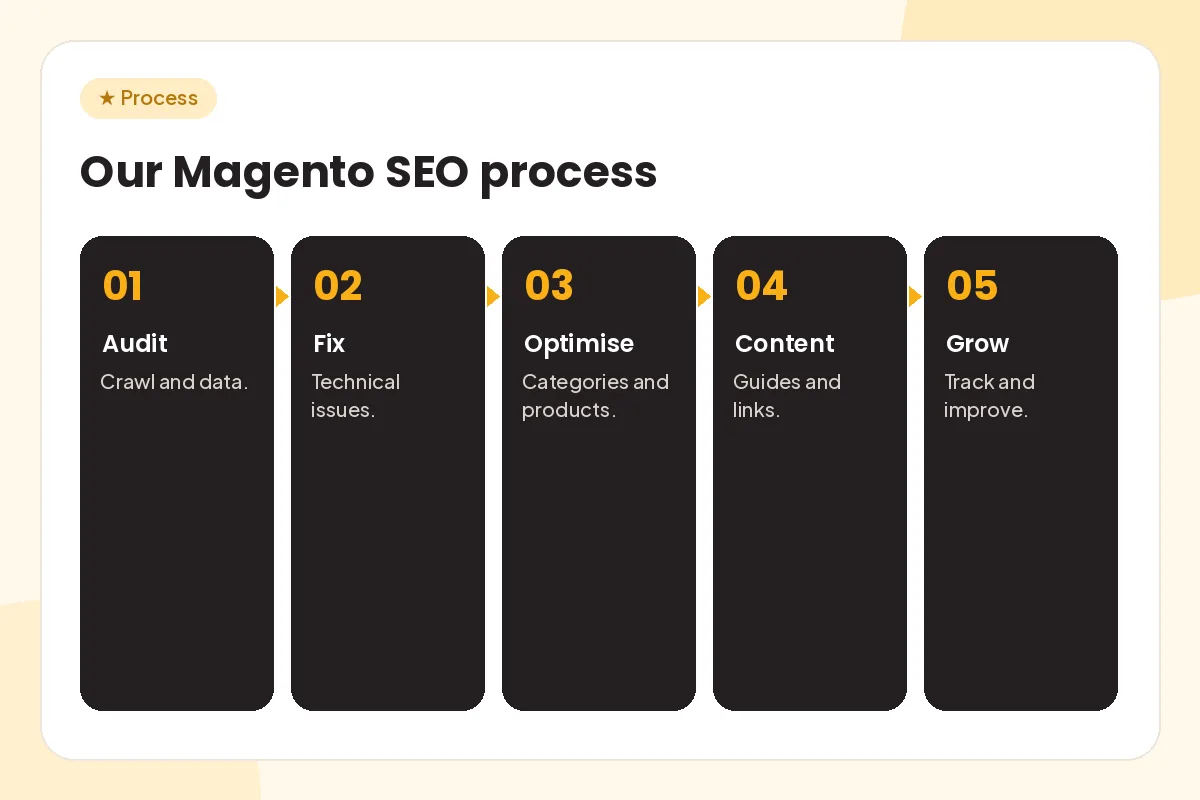
Our Magento SEO process
Audit
Fix
Optimise
Content
Grow
How we measure Magento SEO
We report on what matters to a store: organic revenue and orders from GA4, clicks and impressions from Search Console, rankings for your main categories and products, and how many pages Google indexes compared with how many you want indexed. Each month you see what changed, what we did and what comes next.
We split results by page type, so you can see how categories, products and guides each perform. That makes it easy to see where the next hour of work will bring the most revenue, and to spot problems early, such as a template change that slowed product pages or a new filter that started creating duplicate URLs.
Working with your Magento developers
Many fixes need code or configuration changes. We write clear tickets your developers can act on, with the problem, the fix, examples and how to test it. If you do not have a developer, our Magento development team can make the changes, so SEO and development work together without delays.
Why choose DigiExe for Magento SEO
Short claims you can check.
1,400+ clients in 28 countries
Founder-led SEO
SEO and Magento developers
Revenue-focused reports
SEO results from our team
Our published case studies show the organic growth our SEO process delivers.
Magento stores we help
We work with Magento stores selling fashion, electronics, auto parts, home and furniture, health and beauty, sports equipment and B2B industrial supplies in the USA, India, the UK and Australia. Many have catalogues of thousands or tens of thousands of products.
Services that pair with Magento SEO
Grow your store further.

Jitendra has worked in SEO and ecommerce since starting BloggersIdeas in 2013. He reviews the Magento SEO checklist our team uses.
Jitendra started BloggersIdeas in 2013, runs AffiliateBooster and SchemaNinja, and wrote the international bestseller Inside A Hustler's Brain (20,000+ copies). He has spoken at Affiliate Summit, Affiliate World, DMSS and TES, and works from New Delhi.
Last updated:
Magento SEO: FAQs
Is Magento good for SEO?
Yes, Magento has strong SEO features, including editable URLs, meta data, canonical tags, sitemaps and redirects. But it needs correct setup. Out of the box, layered navigation, product URL paths and weak meta templates can create duplicate content and slow pages. With the right settings and fixes, Magento stores rank very well.
What are the most important Magento SEO settings?
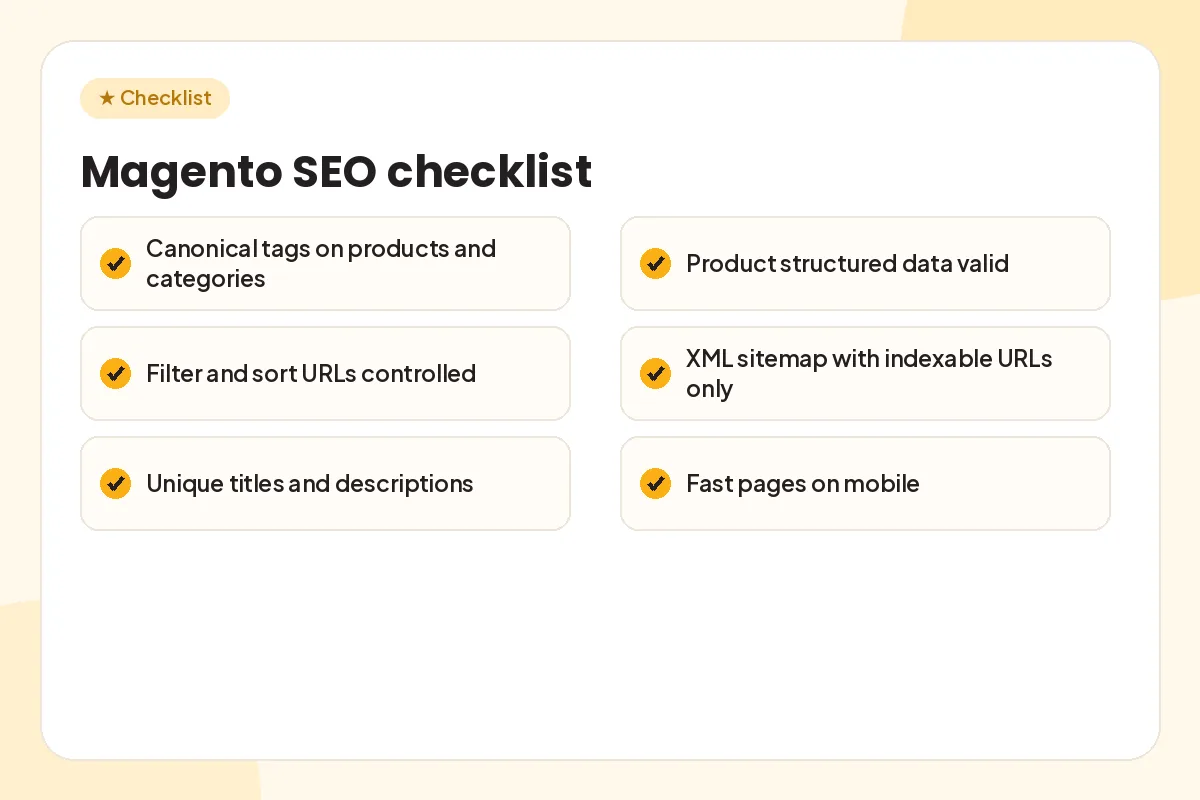
Turn on canonical tags for products and categories, turn off category paths in product URLs, keep URL suffixes consistent, create permanent redirects when URL keys change and use web server rewrites. Then control layered navigation, set meta templates and make sure your XML sitemap only lists pages you want indexed.
How do I stop layered navigation from hurting SEO?
Decide which filter pages have real search demand and let only those be indexed, with their own titles and copy. Add noindex or a canonical to the base category for other filter combinations, keep sort and limit parameters out of the index and use one fixed order for filters in URLs.
Why is my Magento store slow?
Common causes are missing full page cache, no Redis, developer mode on a live store, too many third-party extensions, large images, heavy themes and slow database queries. Cheap hosting also slows Magento. We find the main causes with performance testing and fix them in order of impact.
Should product URLs include the category path?
Usually not. Including category paths can give one product several URLs if it sits in more than one category, which splits ranking signals. Short, top-level product URLs with a canonical tag are cleaner. If you change this on a live store, every old URL needs a permanent redirect.
Do I need a Magento SEO extension?
Not always. Magento covers many basics on its own. Extensions can help with layered navigation rules, meta templates, hreflang and sitemaps for large stores, but each one adds code and possible conflicts. We check what you already have and suggest one well-supported extension or custom code only where it is needed.
How long does Magento SEO take to show results?
Technical fixes, such as cleaning up duplicates and speeding up pages, often show results within one to three months as Google recrawls the store. Category and content work usually takes three to six months to build. Large or very competitive stores can take longer to reach their full potential.
How do I keep rankings when migrating to Magento 2?
Crawl and save every old URL, map each to its best new match with a permanent redirect, keep titles and content on pages that rank and test everything on staging. After launch, submit new sitemaps and watch Search Console for errors. Careful planning usually keeps rankings and often improves them.
What structured data should a Magento store use?
Use Product and Offer schema with price, currency and availability on product pages, AggregateRating and Review where you show genuine reviews, BreadcrumbList for category paths and Organization for your brand. Test templates in the Rich Results Test and fix any errors shown in Search Console.
Is Adobe Commerce SEO different from Magento Open Source SEO?
The SEO basics are the same, because both share the same core. Adobe Commerce adds features such as content staging, customer segments and B2B tools that can create extra pages or personalised content to manage. Adobe Commerce Cloud also includes Fastly caching, which helps with speed.
Can you work with my existing Magento developers?
Yes. We write clear tickets with the problem, the fix, examples and how to test it, so your developers can act quickly. We review changes on staging before they go live. If you do not have developers, our Magento development team can make the changes for you.
How do you report Magento SEO results?
We report organic revenue and orders from GA4, clicks and impressions from Search Console, rankings for key categories and products, and indexed pages compared with the pages you want indexed. Each monthly report explains what changed, what we did and what we plan next, in plain language.
Get your Magento store ranking
Request a free audit. We will review your Magento settings, filters and speed and show you the biggest wins.
Brands We Have Worked With
A few of the businesses that have trusted DigiExe and our founder with their marketing.


What our clients say about DigiExe